Operational guide for multi-location businesses
How to Manage Stock Across Multiple Godowns: Location-Wise Stock and Transfers
A practical guide for Indian wholesalers, distributors, retailers and FMCG stockists to manage stock across multiple godowns with location-wise stock records and documented transfers.
For Indian wholesalers, distributors, retailers and FMCG stockists operating two or more godowns, shops or branches.
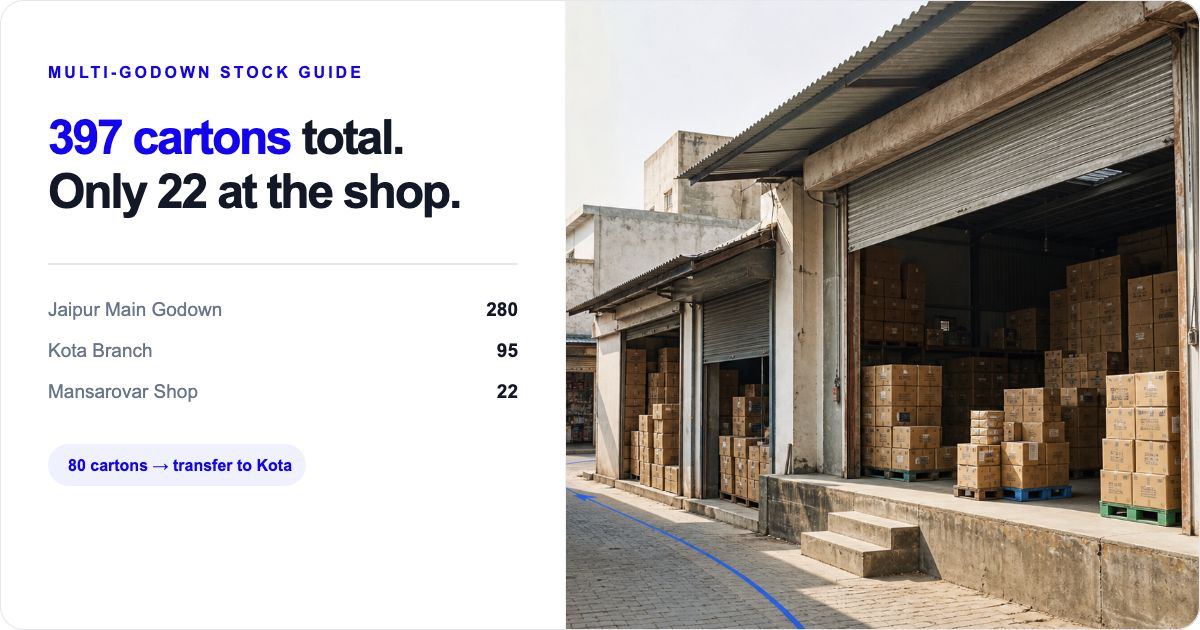
How to manage stock across multiple godowns
To manage stock across multiple godowns, keep separate location-wise stock records for every godown, branch and shop. Record purchase and inward stock at the receiving location, record sale and outward movement at the dispatching location, and use an inter-godown stock transfer whenever goods move internally. Check godown-wise stock before you confirm a retailer order, purchase more goods or dispatch stock.
This matters in the daily moment that costs wholesalers and distributors sales: a salesman confirms a retailer order, the branch or shop is short, but cartons are sitting in another godown. A combined total can look healthy while the dispatching location cannot fulfil the order. Location-wise stock shows whether to dispatch, transfer from another godown, or place a fresh purchase order. If the recorded quantity and shelf quantity differ, use the Inventory Accuracy Guide before changing the location balance. When one internal movement needs a dispatch-to-receipt comparison, use the Inter-Godown Transfer Checklist to check what left, what arrived and what to investigate next.
For the specific handoff from a source godown to a retail shop, see the godown-to-shop stock transfer guide for the destination-count and shortage sequence.
For an FMCG distributor supplying kirana or general-trade retailers, see the worked retailer-order and godown stock example. If a supplier delivery is still being counted, start with the inventory receiving process guide. If your immediate need is choosing the location that can supply a customer order, see location-wise stock management software. If you are checking how much money is tied up by item and location, read the stock value report guide.
If you keep stock in more than one godown, do not manage it as one combined number. Keep a separate stock record for every godown, shop or branch; record every purchase, sale and transfer against the location where it actually happens; and review the location-wise balance before you buy, promise a customer order or dispatch goods.
A combined total can look healthy while the godown that needs to fulfil an order is empty. For example, 420 cartons of biscuits across three locations is not the same as having 420 cartons available in the correct city or branch. Location-wise records show what is actually available where it is needed.
This guide explains a practical operating routine. It also shows where multi-godown management and stock transfers can help in Stock Register. It is not a guide to warehouse automation or reconciliation software.
Why one combined stock total can mislead you
A combined total answers only one question: how much stock exists across the business. It does not answer the operational questions that affect a sale or a purchase:
- Which godown can dispatch the order today?
- Which branch is short and which one has surplus?
- Did the goods arrive at the intended location?
- Was a purchase received into the right godown?
- Is the outward entry being made from the location that actually supplied the goods?
When a shop sells 30 cases but the sale is recorded against the main godown, the company total may still be correct. The location balances are not. That makes the next replenishment, customer promise and physical count harder to manage.
Treat each godown, shop, branch or dispatch point as a separate location. Give it a clear, stable name such as Jaipur Main Godown, Kota Branch or Mansarovar Shop. Avoid names like Store 2 if staff use different names in bills, WhatsApp messages and paper registers.
Set up each location before daily transactions begin
Start with a list of all places where stock can be received, stored, sold or dispatched. For each location, note the responsible person, address, normal inward point and normal outward point. This is an operating list, not a claim that every business needs a complex warehouse structure.
In Stock Register, a store can represent a physical location such as a shop, warehouse or godown. Current product guides show that businesses can create separate stores, switch between them, and see stock and transactions per store. If you use the product, create one store for each location you genuinely need to track; do not create extra locations just for racks or shelves unless your team can maintain them consistently.
Before adding new transactions, enter or verify the opening quantity for each regular item at each location. Opening quantities should reflect a dated, signed starting count. They are the starting point for the record, not evidence that the physical stock will remain correct forever.
Record every inward, outward and transfer at the correct location
The simplest multi-godown discipline is to ask one question before saving any entry: where did this stock physically move?
Record purchases and inward stock at the receiving godown
When a supplier delivers goods, record the purchase or inward at the godown or shop that received the goods. Do not enter it at the head office because the invoice was approved there. Capture the supplier bill number, date, item, unit and quantity so the location record can be traced back to the purchase document.
If one supplier delivery is split between two godowns, make sure the records reflect the actual split. Do not put the entire delivery into one location and use an informal message to tell the other location what it received.
Record sales and outward movement from the supplying location
A sale or outward entry should reduce the stock of the shop or godown that supplied it. This matters even when a central sales person takes the order. The order-taking location and the dispatching location may be different; the stock record should follow the physical dispatch.
For planned outward movements that are not customer sales—such as samples, damage or supplier returns—use the record and process appropriate to your business. Keep the reason and supporting document with the entry so that staff do not mistake it for a sale.
Use a stock transfer for movement between your own locations
A transfer is not a sale and not a new purchase. It moves the same stock from one business location to another. Record the source, destination, date, items and quantities before or when goods leave the source godown. Give the driver or receiving staff the transfer reference along with the goods.
Current Stock Register product evidence shows a Stock Transfer workflow with source and destination selection, available quantities, item quantities and a documented entry. When the Automatic Stock In entry in Godown option is enabled, the destination stock is updated immediately. If your process needs stock to remain uncounted until a receiver confirms it, or requires partial receipts, do not assume this workflow provides that control—confirm the fit before making it your operating policy.
Read what a stock transfer is for the definition and use the dedicated stock-transfer feature page for product-specific setup.
Need to choose the store or godown that can supply an order before you promise it? See location-wise stock management software for the commercial product page.
Example: one FMCG distributor with three locations
Consider Shakti FMCG Distributors, a three-location business with a main godown in Jaipur, a Kota branch and a Mansarovar shop. On Monday morning it holds the following cartons of a popular biscuit item:
| Location | Opening cartons | Monday movement | Closing recorded cartons |
|---|---|---|---|
| Jaipur Main Godown | 240 | Purchase inward: +120; transfer to Kota: -80 | 280 |
| Kota Branch | 60 | Transfer received: +80; customer sale: -45 | 95 |
| Mansarovar Shop | 40 | Customer sale: -18 | 22 |
| Combined business total | 340 | Purchase +120; customer sales -63 | 397 |
Jaipur Main Godown
Closing: 280- Opening cartons
- 240
- Monday movement
- Purchase inward: +120; transfer to Kota: -80
Kota Branch
Closing: 95- Opening cartons
- 60
- Monday movement
- Transfer received: +80; customer sale: -45
Mansarovar Shop
Closing: 22- Opening cartons
- 40
- Monday movement
- Customer sale: -18
Combined business total
Closing: 397- Opening cartons
- 340
- Monday movement
- Purchase +120; customer sales -63
The combined total of 397 cartons is useful for a broad purchase decision. But it does not mean the Mansarovar shop can fulfil a 50-carton local order: it has 22 cartons. The owner can decide whether to serve the order from Jaipur, transfer stock to the shop or buy more—but only after checking the location-wise balance.
In this example, the 80-carton Jaipur-to-Kota movement is recorded as a transfer, not as a sale at Jaipur and a purchase at Kota. The purchase is recorded at Jaipur because that is where the supplier delivered it; the 45-carton customer sale is recorded at Kota because Kota supplied it. The numbers are illustrative and should be replaced with your own units, locations and operating rules.
Follow one item
How 120 cartons move through the example
Supplier purchase
120 cartons inward
Jaipur Main Godown
240 → 280 cartons
Kota Branch
60 → 95 cartons
Customer sale
45 cartons outward
Use the numbers
Turn location-wise stock into the next decision
A shop is short, but another godown has usable stock
- Check first
- Location-wise quantity at the source and shop
- Next step
- Plan a documented transfer
Main godown and combined stock are both low
- Check first
- Main-godown balance and incoming requirement
- Next step
- Consider a purchase
A customer wants immediate dispatch
- Check first
- Quantity at the supplying location
- Next step
- Promise or dispatch only if that location can supply
When a branch or shop is below its working quantity while usable cartons sit elsewhere, use this guide to manage low stock across godowns, branches and shops before choosing a transfer, fresh purchase or retailer dispatch promise.
What Stock Register helps you keep organised
- Separate store records for physical godowns, warehouses or shops.
- Stock and transactions recorded by store, with a combined view where needed.
- Stock transfers with source, destination, items and quantities.
Use location-wise stock to make the next decision
A useful location-wise review is not just a report to file away. Use it to decide what happens next.
- Purchase: Check the balance at the locations that normally receive supplier deliveries. A low combined total and a low main-godown balance may justify a purchase; a low branch balance but surplus elsewhere may justify a transfer instead.
- Customer order: Check the supplying location before promising quantity or delivery timing.
- Transfer: Move a planned quantity from a location with usable stock to one that needs it, then retain the transfer reference.
- Slow stock: Look at each location separately. Stock that is moving at one branch may be idle at another.
Stock Register’s current multi-godown evidence supports store-wise stock views and an All Store Items view for combined quantities and values. Use the multi-godown feature page when you want to evaluate that capability. The practical decision still belongs to the business: the software does not replace the need to decide where a customer order should be supplied from.
Keep a simple physical-check routine
Recorded stock and physical stock can differ because of counting mistakes, unrecorded movement, damage, breakage or an entry made against the wrong location. A simple physical-check routine helps you find and investigate those differences early.
Choose a realistic rhythm: for example, count fast-moving items weekly at each location and slower items on a rotating schedule. Freeze or note the time of the count, count the actual units, compare them with the location’s recorded balance, and keep the count sheet with the date, item, location and counter’s name. Investigate a difference before changing records.
Physical checks are your operating process; Stock Register does not provide stock reconciliation.
Common multi-godown mistakes to avoid
Recording stock at the wrong location
A purchase may be approved by the owner but received at a branch. Record the physical receiving location, not the office that authorised payment.
Using sales entries to represent internal transfers
An inter-godown movement is internal. Recording it as a sale and purchase distorts sales and purchase figures and makes it harder to follow the stock movement.
Letting a combined total decide a customer promise
A combined total cannot tell you whether the order can be dispatched from the relevant location. Check the location balance first.
Allowing informal transfers
A phone call, WhatsApp message or driver note may help communication, but it should not be the only record. Enter the transfer details and retain the reference.
Correcting differences without finding the cause
A physical-count difference is a signal to investigate. Check recent inward, outward and transfer records, units and locations before making any correction.
Creating more locations than the team can maintain
Separate locations only when stock must be independently controlled there. If nobody can consistently choose a particular sub-location on every transaction, the extra detail can make the record less reliable.
A daily and weekly checklist
Daily
- Record each purchase or inward at the receiving godown or shop.
- Record each sale or outward movement at the location that supplied it.
- Record every inter-location movement as a transfer with source, destination, items and quantities.
- Check pending dispatches against the source location’s available quantity before promising a customer order.
- Review unusual negative or unexpectedly low balances at the locations that operated that day.
Weekly
- Review location-wise stock for fast-moving and high-value items.
- Check transfer entries with the sending and receiving teams.
- Compare a scheduled physical count with the recorded quantity at that location and investigate material differences.
- Identify branches with low stock and other locations with usable surplus before placing a fresh purchase order.
- Confirm that staff are using consistent location names and the correct units.
The practical rule
Manage the stock where it lives, not only where it is totaled. When every inward, outward and transfer is tied to the correct godown or shop, location-wise stock becomes useful for everyday decisions: whether to buy, where to dispatch from and when to move stock internally.
Related resources
Frequently Asked Questions
How do I manage stock across multiple godowns?
Create a separate record for every godown, shop or branch; record every purchase, sale, inward, outward and stock transfer at the location where it happens; and check the location-wise balance before buying or dispatching.
What is location-wise or godown-wise stock?
Location-wise stock, also called godown-wise stock, is the quantity of an item recorded separately for each godown, shop or branch. It shows where the stock is available, not just the combined business total.
How do I record an inter-godown stock transfer?
Use a transfer record that names the source godown, destination godown, date, items and quantities. Do not treat an internal movement as a customer sale or a supplier purchase.
Can a wholesaler manage multi-location inventory in Stock Register?
Current product guides show that each store can have its own stock and transactions, while businesses can view stock by store or in a combined view. The team can also review recorded stock movement/history and use store-wise staff access where supported. Test the setup with one regular item and your plan before moving all daily work to it.
Can staff see stock and movement history for only their store?
Where the plan supports store-wise access, staff can work from the store records assigned to them. The stock movement/history remains a recorded business trail for the item and location; confirm the exact access setup with one godown before expanding it to every branch.
Does Stock Register reconcile physical stock with recorded stock?
No. Stock Register does not have a stock-reconciliation feature. You can maintain a physical-count process as an operating routine, but physical counting, variance investigation and any follow-up procedure remain your business process.
What should a distributor check before transferring stock?
Confirm the source godown, destination, item, unit, quantity, available stock and the person responsible for sending or receiving the goods. Keep the transfer reference with the movement.