For Indian wholesale and distribution businesses

Stock Management Software for Wholesalers & Distributors

Customer asks for 20 bags. Can your staff confirm the order before promising it?

This wholesale stock management software helps sales staff check available stock, find the right godown and give the customer a clear answer before billing—without another phone call, notebook check or spreadsheet update.

  • Check stock before billing
  • Find the right godown
  • Confirm the order

Start with one item, one godown and one customer order.

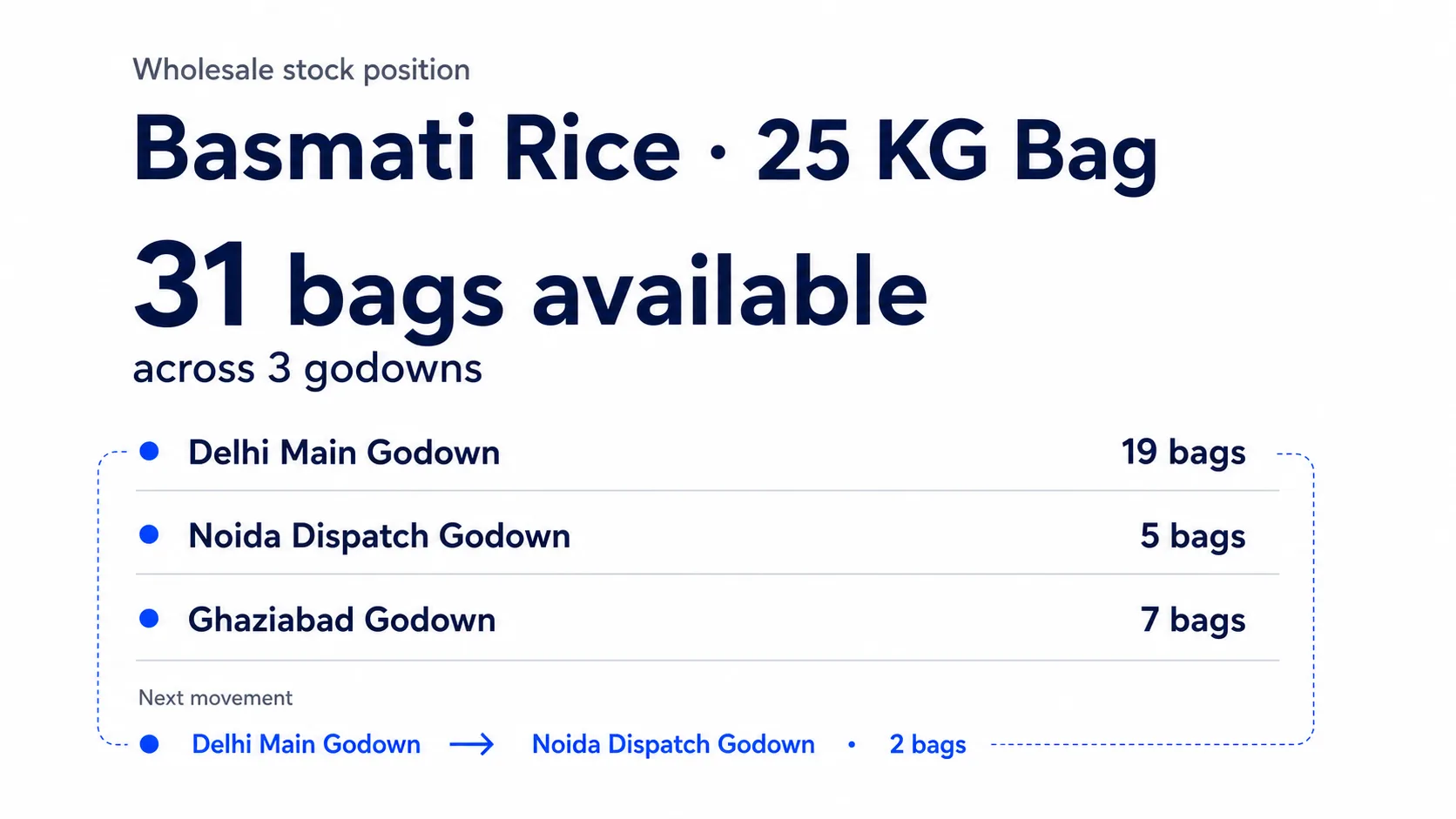
Wholesale stock position showing Basmati Rice available across Indian stores and godowns before an order is confirmed

One wholesale order

From customer request to owner follow-up.

Follow one Basmati Rice order without mixing up two different events: 6 bags move internally between godowns, then 20 bags are supplied to the customer.

Customer asks

“Can you send 20 bags today?”

Basmati Rice

01

Customer asks

20 requested

02

Stock shows

31 total

03

Internal transfer

6 moved · 31 total

04

Customer sale

20 supplied · 11 left

The owner then sees the sale, remaining stock and party balance
01

Sales staff

Check before promising

Before billing

Can we supply 20 bags today?

Before making the bill, sales staff needs one dependable number—not a call to the godown or a notebook entry that may be old.

What staff can act on

  • 31 bags visible in the current stock view
  • Confirm availability before promising the customer

Product proof

Stock Register

Wholesale stock view showing multiple items with opening stock, inward quantities, outward quantities, and current stock before order confirmation
Check how much of the requested item is left before you promise the order.
02

Sales + godown staff

Choose where to send

Before sending

Which godown should send them?

The total is useful, but staff also needs to know where the bags are held and which godown can prepare the order.

What staff can act on

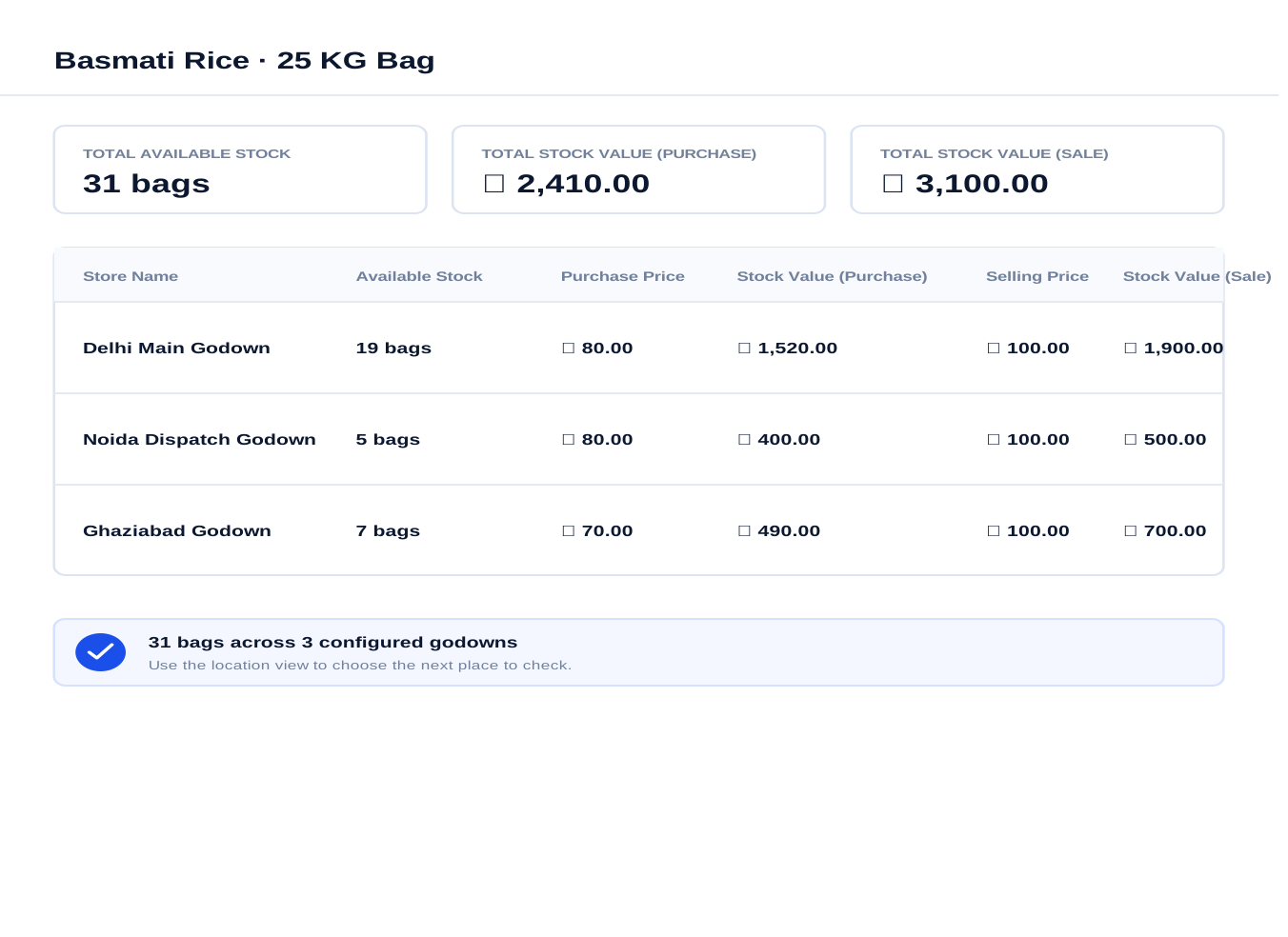
  • 19 bags in Delhi, 5 in Noida and 7 in Ghaziabad
  • Choose the godown before the order reaches the godown staff

Product proof

Stock Register

Stock Register item view illustrating Basmati Rice stock totals and location-wise quantities across Delhi Main Godown, Noida Dispatch Godown, and Ghaziabad Godown
See which store or godown has the Basmati Rice before sending the order.
03

Godown staff

Record the internal transfer

When stock moves

Which godown sent the 6 bags?

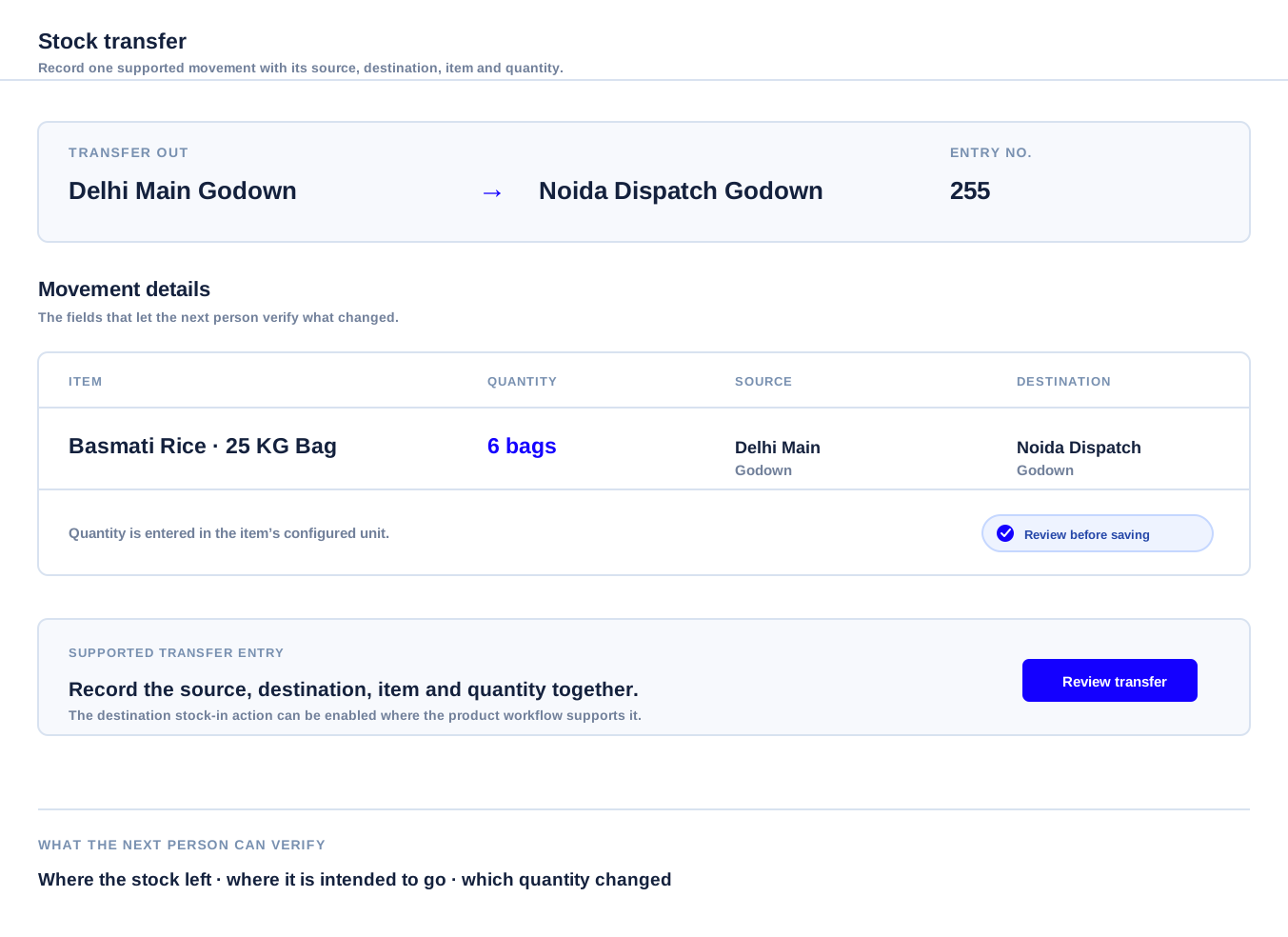
This is an internal movement, not the customer sale. Six bags move between godowns, so the location balances change but total stock stays at 31 bags.

What staff can act on

  • Internal transfer: 6 bags moved between godowns
  • Total stock remains 31; only the godown locations change

Product proof

Stock Register

Illustrated Stock Register transfer-out entry showing Basmati Rice moving from Delhi Main Godown to Noida Dispatch Godown with a six-bag quantity
Record the 6-bag internal transfer without changing the 31-bag business total.
04

Owner after billing

Follow the customer sale

After billing

What remains after billing?

The customer sale is the separate event that reduces stock. Supply 20 bags from the confirmed godown plan, leaving 11 bags from the 31-bag total; the owner can follow the sale and party balance together.

What staff can act on

  • Customer sale: 20 bags supplied
  • 31 available − 20 supplied = 11 bags remaining
  • See the sale, party balance and payment follow-up
See party ledger and payments

Product proof

Stock Register

Stock Register Party Ledger showing a customer balance, sales, purchase, payment entries and the closing balance
Real Party Ledger view. Your own customer, quantities and amounts appear after you enter them.

Now the order moves through your shop

One stock answer. Three people can act on it.

The customer is waiting, the staff needs to send the bags, and the owner needs to know what happened afterward.

02

Sales staff

Check before promising the customer.

See the item, quantity and godown before saying, ‘Yes, we can send it today.’

See stock by godown
03

Godown staff

Send from the right godown.

Know which godown will send the bags, then record what went out or moved.

See stock transfer

Why wholesale stock gets hard to answer

Replace stock calls and late updates with one working record.

For a wholesale business, the useful answer is not just a number. Staff need the item, the unit they sell in, the godown and the latest movement before they promise an order.

That is what stock maintain software for wholesalers should make easier: check, send and follow up from the same record.

Notebook

Breaks:The latest number stays with one person.

Better:Staff can check the current stock record before billing.

Excel sheet

Breaks:Updates arrive late, get duplicated or disagree.

Better:Sales and godown staff work from the same item and location view.

Disconnected billing

Breaks:Sale, stock and party balance need separate updates.

Better:The owner can follow what was sold, what remains and what is due.

Practical result: one clear stock answer before billing.

After this order, the record keeps working

The next purchase starts the same story again.

A wholesale business needs one connected trail from supplier receipt to customer order and payment received. That is how the owner knows what came in, what can go out, what remains and what the customer still owes.

A stock management app for distributors is useful when sales staff, godown staff and the owner can each act on the same item record.

01 · Buy and receive

Add new stock to the godown.

When fresh bags arrive from a supplier, record the item, quantity, unit and receiving godown so the next customer order starts with the right balance.

See purchase reports

02 · Sell before billing

Confirm what you can send today.

Sales staff checks the item, godown and the unit you sell in before billing the retailer or party—so the customer gets an answer before waiting for another call.

See sales reports

03 · Move between godowns

Record the internal transfer.

If another location will send the order, record the 6-bag movement from the sending godown to the receiving godown. This changes location balances, not the 31-bag total.

See stock transfer software between godowns

04 · Follow the party

Record the customer sale.

When 20 bags are supplied, the total falls from 31 to 11. The owner can follow that sale, the remaining stock, party balance and payment together.

See party ledger and payments

Test it with one real order

Try it with one real stock question.

Start with one store or godown, Basmati Rice or one regular item, and one real customer order. Can your staff confirm the 20 bags without making another stock call?

The simple test

If your staff can see whether the 20 bags are available and where they are, you are testing the right thing.

Try it with one item

From adding stock to checking the balance

No paid plan required
01

Start

One location, one regular item

Use the store or godown and the unit your staff uses every day.

02

Record

One real stock entry

Record stock coming in, going out or moving, then check the balance.

03

Check

Can you answer the customer?

If your staff can confirm the 20 bags and where to pick them from, you have tested the right thing.

Start with the stock question your staff gets every day.

Use one item and one location first. Then check the units, batch/expiry and stock-movement details your business needs.

What your staff can do

  • See how much stock you have for each item.
  • See which store or godown has it.
  • Record stock received, sold or moved.
  • See opening stock, stock received, stock sold and what is left.

Check this before you start

  • Check that your plan includes the stores, godowns and staff you need.
  • Try the 20-bag Basmati Rice order with your own item and selling unit.
  • Check batch and expiry needs for the items you distribute.
  • If stock stays in transit or is received in parts, confirm that first.

Compare plans after your trial

Start free, then choose the plan that fits your business.

Try your own items, stores and godowns first. Choose a plan after you know what your staff needs.

No paid plan is needed to start. Choose based on your users, locations and stock work.

Basic Plus

Solo · 1 user

For a solo owner

3,000 / year

2,250 / year

1 User · excl. GST

  • Inventory and GST billing
  • Android app and web dashboard
  • Stock reports and cloud backup
Start the 7-day free trial

Check your locations and units before you start

Advance Plus

Owner + staff

For a business operating across locations

4,800 / year

3,600 / year

Owner + 3 Staff (4 Users) · excl. GST

  • Inventory and GST billing
  • Owner + 3 staff access
  • Choose what each staff member can do
Start the 7-day free trial

Check your locations and units before you start

For businesses that need more control

Advance Pro

Owner + staff

For businesses that need more control

8,000 / year

6,000 / year

Owner + 3 Staff (4 Users) · excl. GST

  • Approval before key actions
  • See the activity history
  • More control for owner and staff
Start the 7-day free trial

Check that the approval setup fits your staff before you start.

Questions wholesalers ask

Questions to settle before you move your stock.

Start with the question your staff gets every day: can we supply it, where is it, or what changed?

Each answer starts with what you need to know, then shows what to check.

Before you promise

Can your staff answer the customer from one stock view?

Can my sales staff confirm a customer order before calling the godown?

Short answer: Yes. Sales staff can check the current item quantity and see which store or godown has it before promising the customer. Godown staff can then confirm where to pick it, while the owner can see the sale, remaining stock and party balance together.

Can I see the same item across multiple stores and godowns?

Short answer: Yes. Check the total quantity and the quantity at each store or godown, so staff can decide where the order should be picked from.

Does this stock maintain software for wholesalers show what came in, went out and is left?

Short answer: Yes. See opening stock, stock received, stock sold or sent, and the current balance for each item. Start with one regular item and compare it with your physical count.

Do sales, purchases, party balances and payments stay connected?

Short answer: Yes. The owner can follow what was purchased, what was sold, what stock remains, what the party owes and which payment was received without joining separate updates later.

Does a purchase entry increase the stock at the right godown?

Short answer: Record the supplier, item, quantity, selling unit and receiving godown so the stock position starts from the receipt your staff actually made.

After billing, can I see the sale, remaining stock and party balance together?

Short answer: Yes. The sale reduces the stock position and stays connected to the party account, so the owner can follow what was sold, what remains and what is due or received.

Can I start with one store, one item and one real customer order?

Short answer: Yes. Add one location, use the unit your staff sells in, record one stock entry and test whether staff can confirm the order without making another stock call.

When stock moves

Can your staff see where the stock is and what changed?

Does it work as a stock management app for distributors?

Short answer: Yes. Sales staff can check stock on Android or the web, while godown staff records receipts, sales and transfers against the same current stock view.

What happens when stock moves from one godown to another?

Short answer: Stock transfer software between godowns records the sending godown, receiving godown, item and quantity, so staff can see where the stock came from and where it should now be counted.

Can I track bags, boxes, strips, pieces or other selling units?

Short answer: Yes. Use the units your staff buys and sells in, such as bags, boxes, strips or pieces, then test one real item before moving your daily work across.

Can distributors track batch and expiry information?

Short answer: For items that need batch or expiry details, test those fields with one real item and confirm that the setup matches how your staff receives and sells the stock.

Check the fit for your business

Will it fit the way your staff sells and stores stock?

What is stock keeping software for a wholesale business used for?

Short answer: It helps the owner and staff track stock received, stock sold, stock moved, stock left and the party balance created by each sale.

Is this better than notebooks, Excel or disconnected billing?

Short answer: Yes. A notebook leaves the latest number with one person, Excel updates can be late or duplicated, and disconnected billing keeps the sale, stock and party balance apart. Stock Register helps staff check available stock and the right godown before billing.

Can the owner control what each staff member can see or change?

Short answer: Use staff access and approval controls where your plan supports them, then test the exact work you want sales staff and godown staff to perform.

When would I need a separate delivery or warehouse system?

Short answer: If your main work is route planning, delivery tracking, advanced picking or stock received in parts, check a system built for that work too. This page focuses on stock, sales, purchases, godowns and party balances.

Do I need to pay for a plan to start the trial?

Short answer: No. Start the seven-day trial with one item, one godown and one real customer order. Choose a plan after your staff knows what it needs.