Customer’s item
CHECKEDHardware shop inventory software
Find the right size before you quote the customer.
24 lengths requested today.Stock Register keeps the item, unit and godown in one answer—so the counter can quote with confidence.Start with one item, one location and one customer bill.
Item25 mm PVC Pipe
Pune Main Godown72 lengthsCan dispatch today
Total in all godowns116 lengths
25 mm PVC PipeWhite finish · 3 m
Order to quote
LIVE72 lengths available at Pune Main Godown
hardware stock by godown
Which location can supply the requested size?
For a contractor or builder order, a business-wide total is not enough. The counter needs the right size, selling unit and supplying godown before it quotes.
Customer order · 25 mm PVC Pipe
The right size can leave the right godown.
Stock Register gives the counter one answer to the question behind the call: which location can supply the requested hardware before billing?See stock across godowns
Check the stock record before billing
See the record behind the customer promise.
Start with the requested size and unit. Move material only when another location needs it. After billing, leave the next counter call with a clear item balance.
Three stock checks for a customer order.
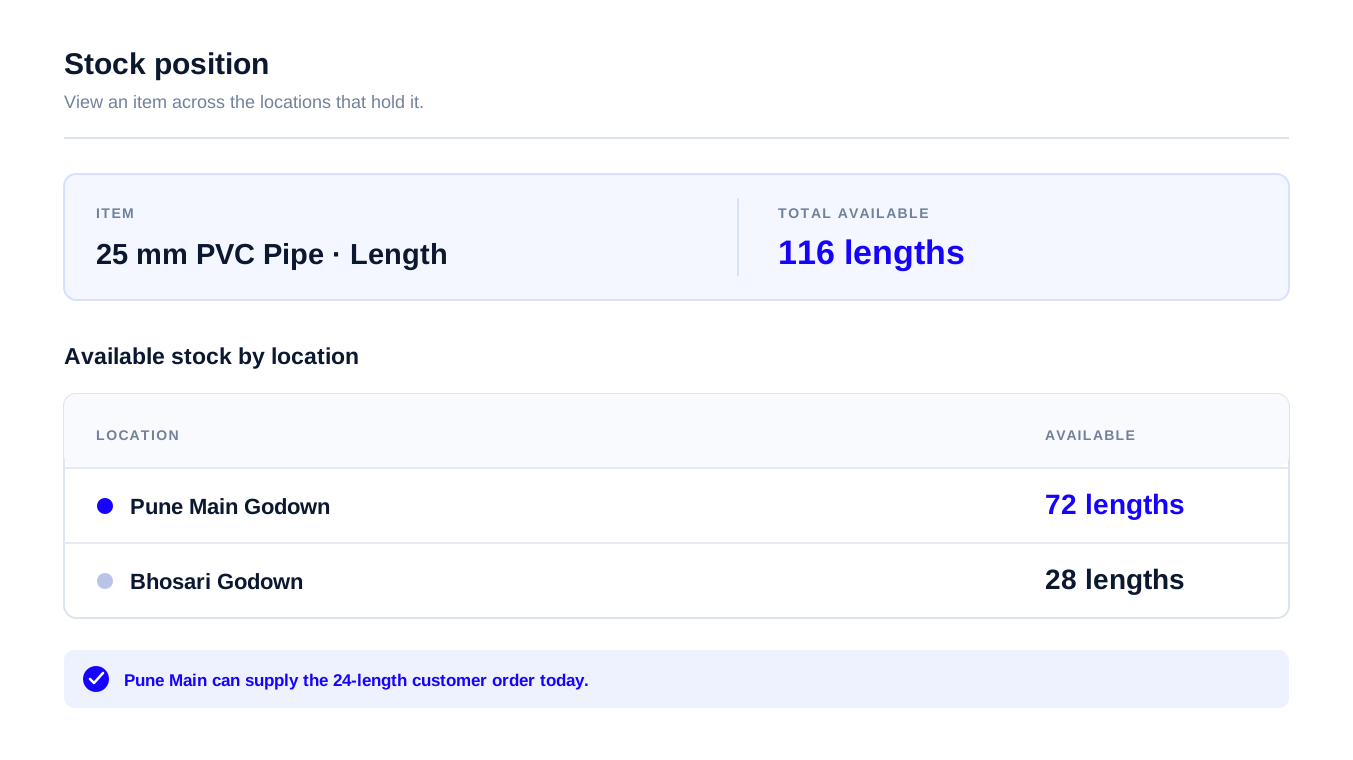
Find the godown that can dispatch today.
The supplying location is visible before billing.
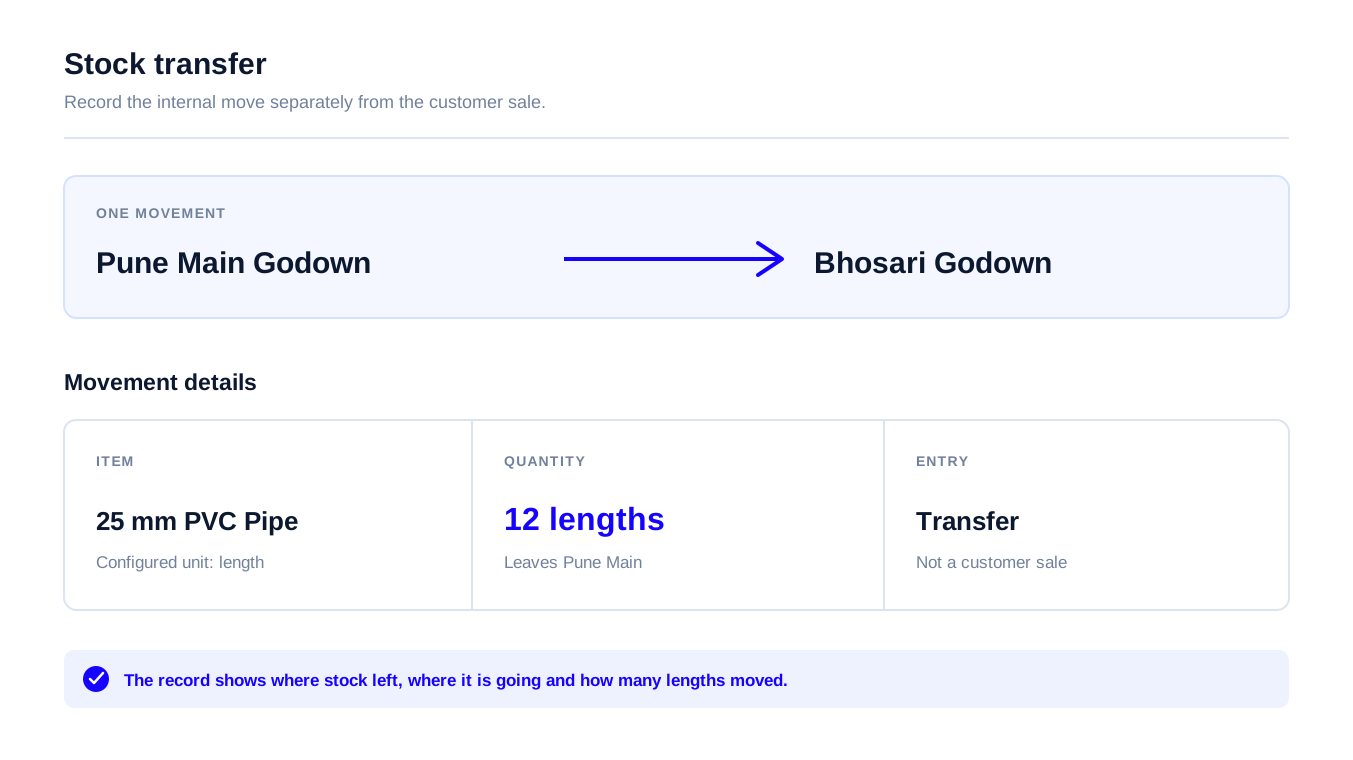
Record units moving between godowns.
The internal move stays separate from the sale.
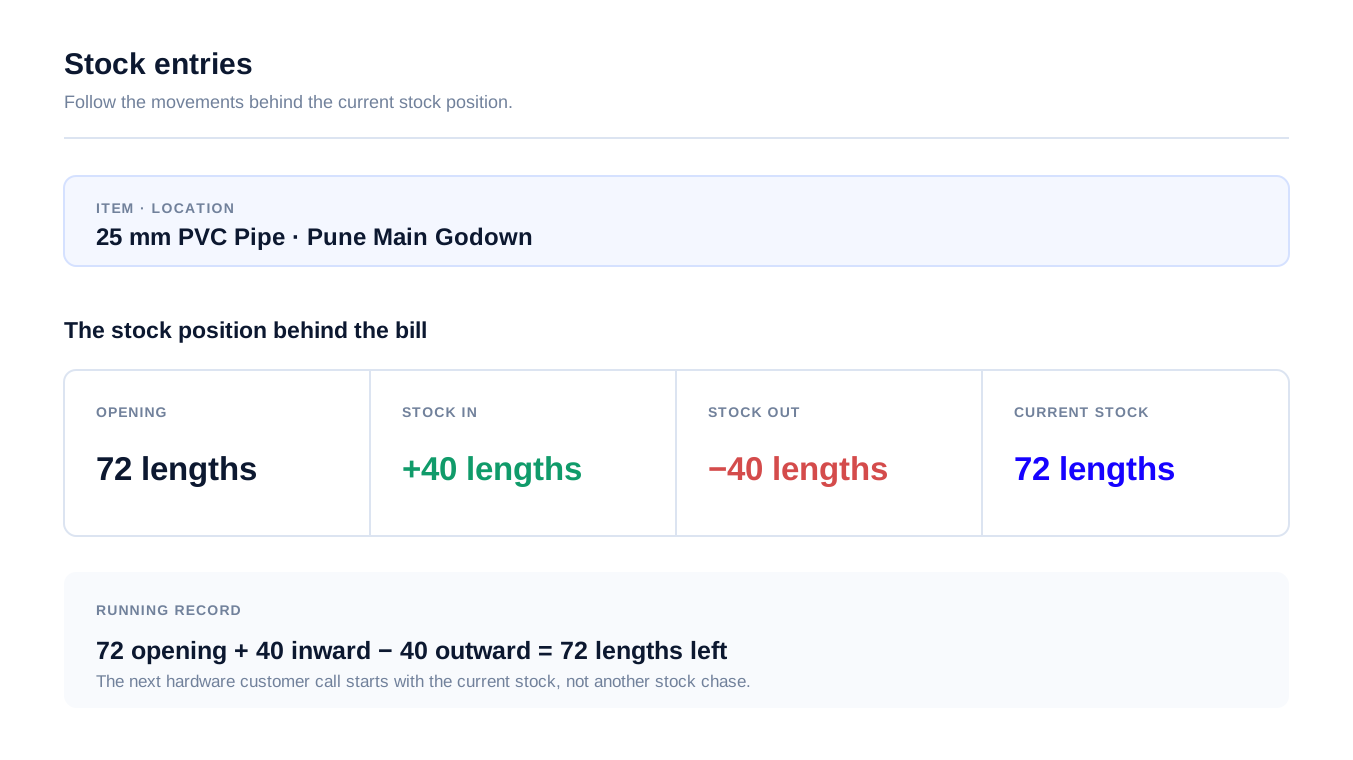
See the item balance after billing.
Opening + inward − outward = current stock.
A safer way to start
Do not move the whole hardware catalogue on day one.
Test the daily hand-off with one real customer order. If your counter and godown staff can use the same record without extra calls, expand from there.
The first useful test is not a full migration. It is one SKU, one location and one customer order.
Choose one regular SKU
Start with one pipe, bag, paint or fastener item your counter is asked for most.
Choose one godown
Use the location where staff currently spends the most time checking or calling.
Run one customer order
Check the quantity, supplying godown, transfer and bill with the people who do the work.
Add the next location
Once the first hand-off is clear, add the other godowns, items and staff your business actually needs.
Choose the right kind of software
A good fit is clear before you move your whole business.
Stock Register is hardware stock management software for a hardware shop or hardware stockist who needs the counter, godown and owner to work from the same record. It is not presented as a complete field-sales DMS.
Stock Register fits when you need
- Stock by shop, godown or branch
- Purchases, sales, transfers and stock left
- Party ledger and payment follow-up
- Low-stock quantity for regular items
Choose a fuller DMS when you need
- Beat plans or salesman route tracking
- Customer ordering network or secondary sales
- Van sales, delivery tracking or collections
- Scheme settlement, FEFO or in-transit stock
Compare plans after your trial
Start free, then choose the plan that fits your business.
Try your own hardware items and godowns first. Choose a plan after you know what your counter and godown staff need.
No paid plan is needed to start. Choose based on your users, locations and daily stock work.
Basic Plus
Solo · 1 userFor a solo owner
₹3,000 / year
₹2,250 / year
1 User · excl. GST
- ✓Inventory and GST billing
- ✓Android app and web dashboard
- ✓Stock reports and cloud backup
Check your locations and units before you start
Advance Plus
Owner + staffFor a business operating across godowns
₹4,800 / year
₹3,600 / year
Owner + 3 Staff (4 Users) · excl. GST
- ✓Inventory and GST billing
- ✓Owner + 3 staff access
- ✓Choose what each staff member can do
Check your locations and units before you start
For businesses that need more control
Advance Pro
Owner + staffFor businesses that need more control
₹8,000 / year
₹6,000 / year
Owner + 3 Staff (4 Users) · excl. GST
- ✓Approval before key actions
- ✓See the activity history
- ✓More control for owner and staff
Check that the approval setup fits your staff before you start.
For the wider hardware business
Keep the item record clear after the sale.
Carry the same item record from supplier receipt to stock movement, billing and customer payment follow-up.
Wholesale stock management
Stock management software for wholesalers and hardware shops
See purchases, godowns, sales, stock reports and customer balances in one connected business view.
See the wholesale stock pageBefore you quote, bill or transfer
Answers for the hardware counter and godown.
What is hardware shop inventory software?+
It helps a hardware shop keep item details, purchases, sales, godown transfers and customer balances in one working record. The immediate job is checking the right item and supplying location before confirming an order.
Can I keep different pipe sizes and brands separate?+
Yes. Set up each size, brand or other variation as its own item or item detail, then test search and stock reporting with the combinations your counter sells most.
Can I sell bags, boxes, pieces, litres or metres?+
Use the units your hardware counter actually quotes, such as bags, boxes, pieces, litres or metres. Confirm the item setup and billing unit with one real product before importing the catalogue.
Can I scan hardware items while creating a bill?+
Barcode search can help the counter find an item faster when the item has a usable barcode. Test a real barcode, the resulting item, its unit and the final bill during the trial.
Can I see stock separately in the shop and godown?+
Yes. Review the item by store or godown as well as in a combined view, then identify the location that should supply the customer before billing.
Can I transfer material from shop to godown?+
Yes. Enter the sending location, receiving location, item and quantity as a separate stock transfer. Keep that internal movement separate from the customer sale.
Can I track contractor or builder balances?+
Use the party ledger and payment record alongside sales and purchases to follow a contractor, builder or other customer balance.
Can billing staff work without seeing every owner control?+
The available plans include owner and staff access. Check the plan and permissions with your team during the trial before moving daily billing work.
Can Stock Register replace a full construction-material or field-sales system?+
No. Stock Register covers the verified stock and billing work described here: items, units, godowns, sales, purchases, transfers, party balances and reports. A separate construction-material, delivery or field-sales system may be needed for work outside that boundary.
What should I test before moving the catalogue?+
Test one bag item, one metre item, one barcode, one shop-to-godown transfer, one customer bill and one payment entry. Confirm that the team can see what remains after each action.