Best Stock Management Software for Small Business
Manage stock of multiple stores, godown, warehouses & factories. Track daily opening stock & closing stock, stock value, low stock items. It's complete solution for inventory, barcode scanning, and order management.

Use on Inventory Software both mobile & PC

0+
App Downloads

Mobile & PC access
Real-time data sync up

4.5/5
Play store rating

Multi-user access
Use with partner & staff

100% safe & secure
Auto cloud data backup
Loved the simplicity in this app, it is a perfect solution for inventory management, low stock alert and billing.If there are any issues the developer gives a prompt response and solution which is a very good thing. - Pritesh Ranawat (Retail Store)
Best Stock Management Software for Small Business in India
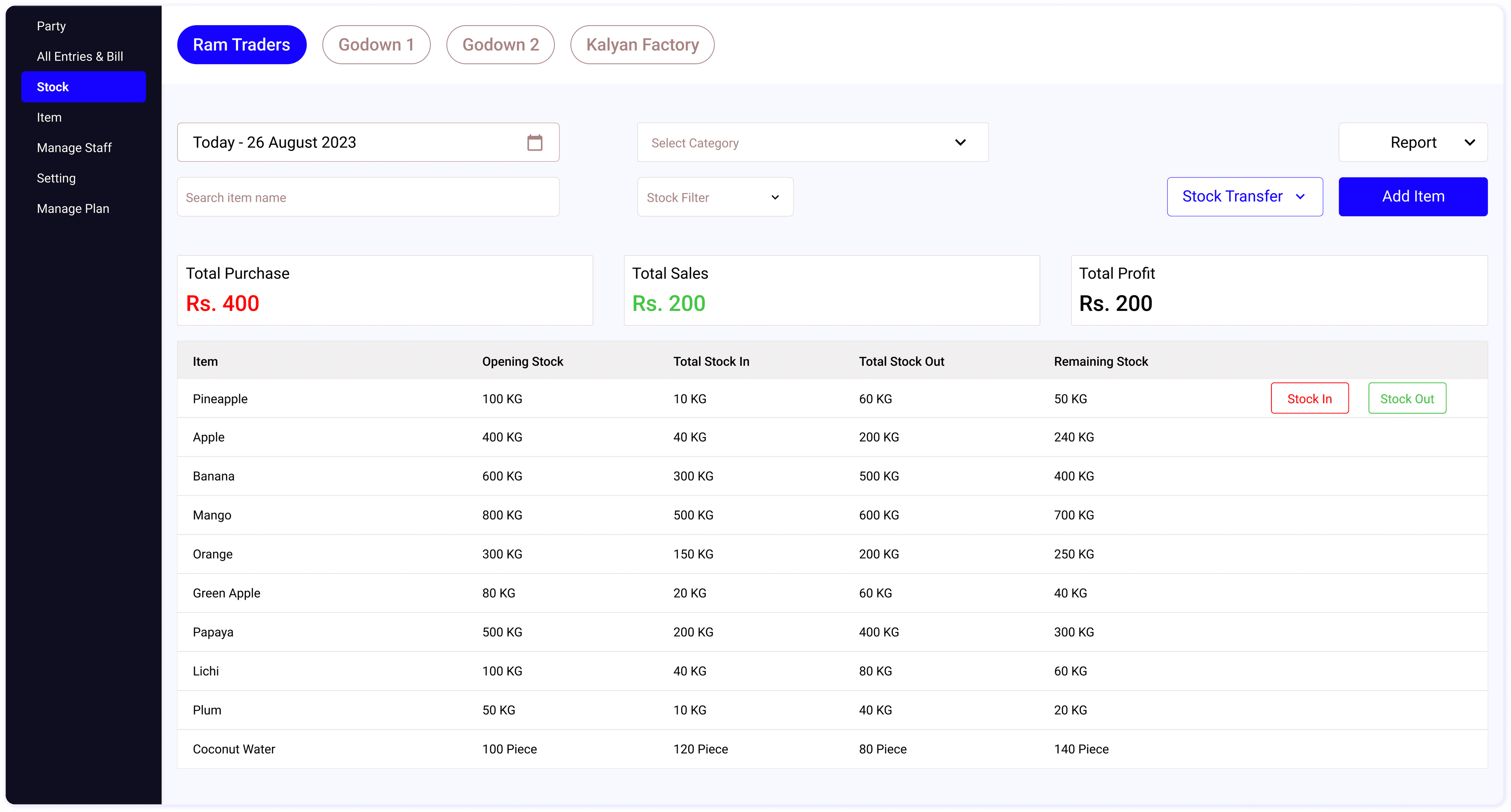
Track daily stock level
Our stock management software allows you to track the stock level of every item. You can see the stock level on daily/weekly/monthly basis. Our inventory management software helps you to record party details, create sales orders, convert into invoice and adjust inventory automatically.
Manage unlimited items & Categories
You can manage unlimited items. You can add multiple units, GST details, categories of the item. You can copy items from one store to another store. Our inventory management software also allows you to add multiple items in a single items by uploading excel sheet of items.
Monitor daily sales, purchase & profit
Create sales order, sales invoice, purchase entries, payment entries of the party at one place. Our inventory management software helps you to quickly track daily total sales, purchase and profit. Create GST invoice, manage GST information of items.
Easily manage multiple stores & godowns
Our inventory management software helps you to manage the inventory of multiple stores & godowns easily. You can manage store-wise inventory and track the inventory summary of all the stores in one place.
Share access with business partners & staff members
Our multi-user login system allows staff members to manage & track inventory. Different staff role types enable you to grant access to specific stores and restrict staff access as needed.
Create PDF Reports & Export Excel sheets
Generate professional invoices, sales orders, download inventory reports, and export data in Excel format.
Inventory Management Made Easy
Inventory management software that match your requirements

Track Inventory of All Shops, Godowns
Use Stock Register to manage inventory of all stores & godown. Stock Register Software is inventory management software to track inventory of all items, create daily stock report, track low stock items. Adding new items in Stock Register is very simple and fast, you can items without price details as well. You can also m...
Transfer Stock From One Godown to Another
Our inventory management sofwtare is designed to manage the inventory of multiple godowns. You can easily transfer inventory from one godown to another godown/store. You can also generate stock issue, stock receive vouchers.


Manage Quotation, Purchase Order
Create quotation, sales order, purchase order, delivery challan forms easily and their open & complete status. Record sales return, purchase return of any sales/purchase and track the return status of all the sales & purchase. You can also download & print quotation format, sales order format, purchase order format, delivery challan format.
Create GST Invoice, Delivery Challan
Use our inventory management & billing software to generate the gst & non-gst invoice. You can enter the HSN, tax details of each item to create the gst invoice. You billing software automatically calculate the CGST, SGST of each item and tax slab and create a tax table in the gst invoice. You can create the original copy, supplier copy, transport copy, delivery challan of any invoice.

Effortless Item, Barcode, Category Management

Manage Item price list

Use Barcode Scanner for Item Details

Category Wise Item Management
All the Features You Need in Inventory Management & Billing Software
Features needed for Inventory Management
Manage unlimited items
Manage multiple godowns
Item wise stock summary
Upload item excel sheet
Category wise inventory management
Create stock issue/receive receipts
Cloud based inventory management
Bulk Item Edit
Add stock in, stock out
Manage inventory transfer
Low stock items
Track total available stock quantity
Search items by scanning barcode
Store/godown wise inventory management
Login from anywhere to manage your inventory
Manage multiple shops
Item wise stock movement details
Item price list
Track total stock value
Generate barcode labels
Multiple roles for staff access
Use our android app & website
Features needed for Invoice & Accounting Management
Create invoice in 1 minute
Multiple invoice formats
Generate delivery challan
Track total sales, purchase profit
2/3/4 inch thermal printing
Convert purchase order into purchase bill
Track Returned Sales/Purchase
Check party wise receivable/payable
Create party ledger
Cash + bank balance
Expense Reports
Create gst & non-gst invoice
Create quotation
Manage sales & purchase
Check sales bill profit
Generate supplier, transport copy
Track status of quotation, order
Generate Party Ledger
Check total receivable/payable
Party excel upload
Generate GSTR-1, GSTR-2 reports
Customise invoice
Create sales/purchase order
Edit sales bills
Print invoice on A4, A5 paper
Convert quotation to sales bill
Create Sales Return, Purchase Return
Manage unlimited customers & suppliers
Manage party wise sales, purchase
Expense management
Sales, purchase reports
Designed For Every Business
Stock Register Software is built for every business looking for stock management and billing solutions. It is ideal for retailers, wholesalers, distributors, and small manufacturers. Stock Register is used across various industries as a reliable stock management software.
Start with 3 easy steps in 1 minute
Start managing your inventory on the cloud
Start your 7 days free trial now. No need to pay up front. Automatic cloud data backup
Trusted by 2,00,000+ small businesses in India. Made in India
Why Do Small Businesses Need Stock Management Software?
Most small businesses in India still track inventory in notebooks or Excel sheets. Here are the real problems this creates — and how stock management software solves each one.
Problem: Stockouts during peak demand
You find out an item is out of stock only when a customer asks for it. By then, you have already lost the sale — and possibly the customer. This happens daily in kirana stores, medical shops, and hardware stores that rely on manual stock checking.
Solution: Low stock alerts & reorder points
Stock management software tracks every item in real time. Set a minimum stock level for each item — when stock falls below that level, you get an automatic alert. Stock Register also lets you create purchase orders directly from the low stock list, so you can reorder from your supplier in one tap without switching apps.
Problem: Dead stock eating your capital
Without visibility into what is selling and what is sitting idle, you end up with ₹50,000–₹2,00,000 worth of dead inventory gathering dust in your godown. This is capital that could be invested in fast-moving items instead.
Solution: Stock aging & valuation reports
Stock management software shows you exactly which items have not moved in 30, 60, or 90 days. Stock Register generates dead stock reports, stock valuation reports, and category-wise inventory analysis — so you can identify slow-moving items early, run clearance sales, and redirect your working capital to items that actually generate revenue.
Problem: Excel errors and data loss
One wrong formula, one accidentally deleted row, or one unsaved file — and your entire stock record is wrong. Excel has no audit trail, no automatic backup, and no way to track who changed what. Businesses lose thousands of rupees every month due to stock mismatches caused by manual entry errors.
Solution: Automatic stock adjustment with every transaction
When you create a sales invoice, stock is deducted automatically. When you record a purchase, stock is added. In Stock Register, every entry has a timestamp, bill number, and user ID — so you can trace any discrepancy back to its source. You can also scan barcodes to add items to invoices, eliminating manual item search and typo errors. Automatic cloud backup ensures your data is never lost even if your phone or PC is damaged.
Problem: No visibility across multiple stores
If you run 2–3 shops or have a separate godown, you have no idea how much total stock you hold across locations. Transferring stock between stores means phone calls, WhatsApp messages, and manual register updates — leading to constant mismatches.
Solution: Multi-store inventory on one dashboard
Stock Register gives you a single dashboard showing inventory across all your shops, godowns, and manufacturing units. Transfer stock between any two locations with one tap — both locations update simultaneously. You can also assign staff members to specific stores with role-based access, so your godown manager only sees godown data, not your profit reports.
Stock Management Software vs Excel — Which is Better?
Excel works when you have 20–50 items in one store. But as your business grows, the limitations become costly. Here is an honest comparison to help you decide.
| Capability | Excel / Google Sheets | Stock Management Software |
|---|---|---|
| Stock update on sale | Manual — you update the sheet after each sale | Automatic — stock deducts the moment you create an invoice in Stock Register |
| Multi-store tracking | Separate sheets per store, no combined view | All stores on one dashboard with store-wise filtering |
| Low stock alerts | Not possible — you check manually | Automatic alerts when stock falls below reorder level |
| Barcode scanning | Not supported | Scan barcodes to add items to invoices. Stock Register also generates barcode labels for items that don't have barcodes |
| GST invoice creation | Separate tool needed — no connection to stock | Create GST/non-GST invoice with auto CGST/SGST/IGST calculation + auto stock adjustment. Generate GSTR-1 and GSTR-2 reports |
| Reports | Build formulas yourself — pivot tables, VLOOKUP | 20+ ready-made reports — stock summary, stock value, profit, sales, purchase, party ledger, GSTR-1, GSTR-2. Download as PDF or export to Excel |
| Data safety | File on your computer — risk of corruption, accidental deletion | Automatic cloud backup — data is safe even if phone/PC is lost |
| Staff access control | Anyone with the file can see and edit everything | Role-based access — restrict staff to specific stores, hide profit data, control who can edit prices or give discounts |
| Cost | Free (but you pay with your time and errors) | ₹75–₹300/month depending on plan |
The real cost of Excel: A medium-sized retail shop with 500+ items spends 1–2 hours daily on manual stock updates in Excel. That is 30–60 hours per month — time that could be spent serving customers, negotiating with suppliers, or growing the business. Stock management software reduces this to near zero because inventory updates happen automatically with every sale and purchase. Over 2,00,000 businesses across India have already made this switch using Stock Register.
How to Choose the Best Stock Management Software
There are dozens of stock management apps in India — Vyapar, Tally, Zoho, Busy, Marg, and more. Here are the 8 things you should check before choosing one for your business.
Multi-store & godown support
If you have more than one shop or a separate godown, the software must track inventory per location and let you transfer stock between them. Many apps only support a single store — check this first.
GST-compliant billing built in
Your stock software should create GST invoices with automatic CGST/SGST/IGST calculation, HSN codes, and proper tax breakup. Stock Register also generates GSTR-1 and GSTR-2 reports directly from your sales and purchase data — so you do not need separate accounting software for GST filing.
Works on both mobile and PC
You need to check stock from your shop, update it from the godown, and review reports at home. The software should work seamlessly on Android phones and on PC/laptop through a web browser — with data syncing in real time. Stock Register works on both — use the Android app at your shop counter and the web app on your PC for detailed reports. Many competitors like Tally and Busy are desktop-only.
Automatic stock adjustment
Every sale, purchase, return, and stock transfer should automatically update your inventory. If you are still manually updating stock after creating an invoice, the software is not doing its job.
Useful reports — not just data dumps
Look for stock summary, stock value, low stock, dead stock, profit, sales, purchase, and party ledger reports. Stock Register offers 20+ reports — all downloadable as PDF and exportable to Excel. You can also generate stock reports filtered by store, godown, category, or date range.
Staff login with access control
If you have employees managing the shop or godown, they need their own login. But they should not see your profit data or other store details. Role-based access lets you grant specific permissions to each staff member.
Cloud backup — not just local storage
Software that stores data only on your phone or computer is risky. If the device is lost, stolen, or damaged, your entire business data is gone. Cloud-based stock software backs up data automatically — accessible from any device, anytime.
Affordable pricing for small business
Enterprise software like SAP or Oracle costs ₹50,000+ per year and is built for large companies. For Indian small businesses, look for software priced between ₹75–₹300 per month that includes all essential features without hidden charges. A free trial helps you test before paying. See Stock Register pricing plans.
Stock Register checks all 8 boxes — multi-store, GST billing, mobile + PC, auto stock adjustment, 20+ reports, staff roles, cloud backup, and plans starting at ₹75/month.
Who Uses Stock Management Software in India?
Stock management software is used by businesses of all sizes across India — from single-store kirana shops to multi-location retail chains. Here are the industries that benefit the most.
Stock management software for wholesalers and distributors
Stock management software for wholesalers and distributors — see stock by godown, confirm customer orders, record transfers, and keep sales, parties and payments connected.
Kirana & General Stores
Track 500–5,000 SKUs across multiple categories. Get low stock alerts for fast-moving items like cooking oil, dal, and spices. Create GST bills for wholesale customers and manage credit accounts.
Medical & Pharmacy Shops
Track batch numbers and expiry dates for every medicine. Get alerts before stock expires. Maintain Drug License compliance records and manage returns for expired items.
Hardware & Building Material Shops
Manage heavy inventory with items in different units — pipes by feet, cement by bags, paint by litres. Track godown stock separately from shop display stock. Handle bulk B2B orders with credit terms.
Electronics & Mobile Shops
Track items by serial number and IMEI number. Manage warranty records for each product. Create professional invoices with GST for high-value items like phones, laptops, and appliances.
Garment & Cloth Shops
Manage inventory by size, colour, and style variants. Track seasonal stock and identify slow-moving designs for clearance. Useful during festive season rushes when stock moves fast.
Grocery & Supermarket
Handle high transaction volume with barcode scanning for faster billing. Track perishable items with expiry management. Monitor daily sales and purchase patterns to optimise reordering.
Furniture Stores
Track made-to-order items alongside ready stock. Manage raw materials (wood, fabric, fittings) and finished goods separately. Create quotations for custom orders and convert them to invoices.
Restaurants & Food Business
Track raw material consumption against menu items sold. Monitor daily kitchen stock usage. Set par levels for essential ingredients to avoid running out during peak hours.
Small Manufacturers & Factories
Track raw materials, work-in-progress, and finished goods separately. Manage bill of materials (BOM) for production. Monitor production output against raw material consumption for cost control.
Frequently Asked Questions
Last updated: February 2026