Tell the counter which store can supply.
Find the store or godown before you say yes.
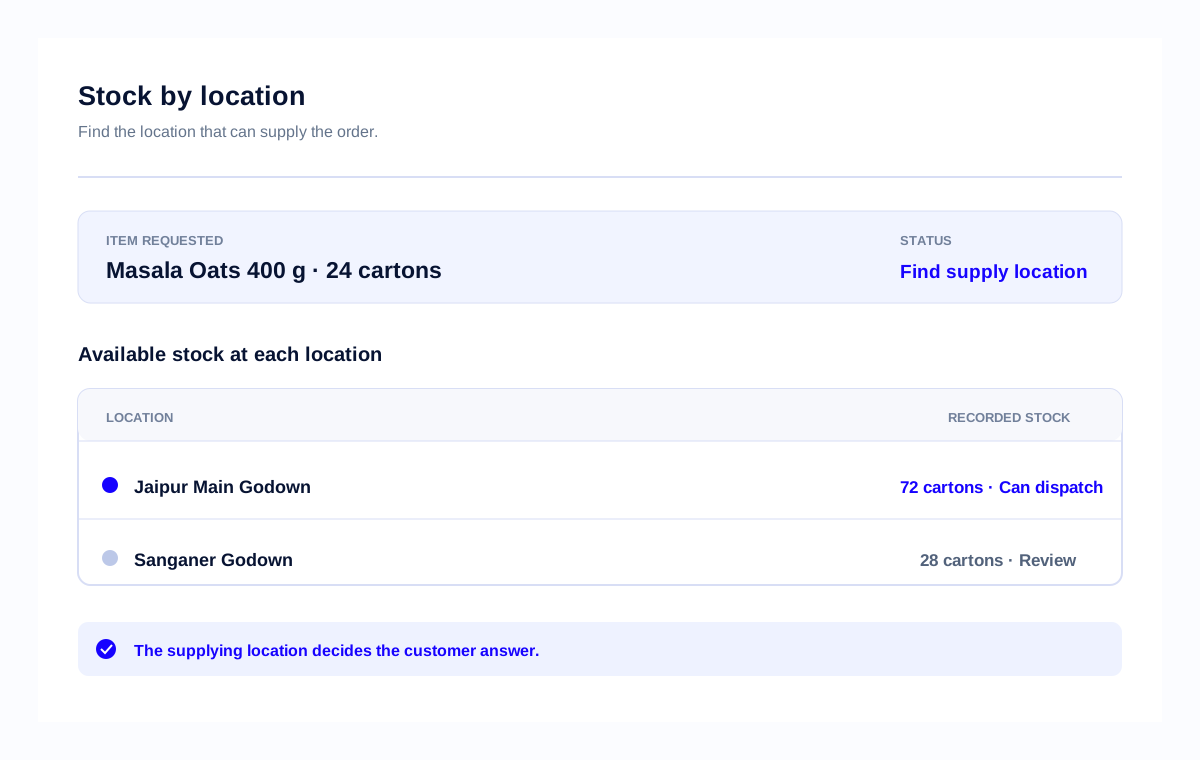
Location-wise stock management software

Before you say yes
Check the store or godown first. Record a transfer only when stock changes place. Review movement when sales and store numbers do not match.
Three stock checks before you send the order.
Find the store or godown before you say yes.
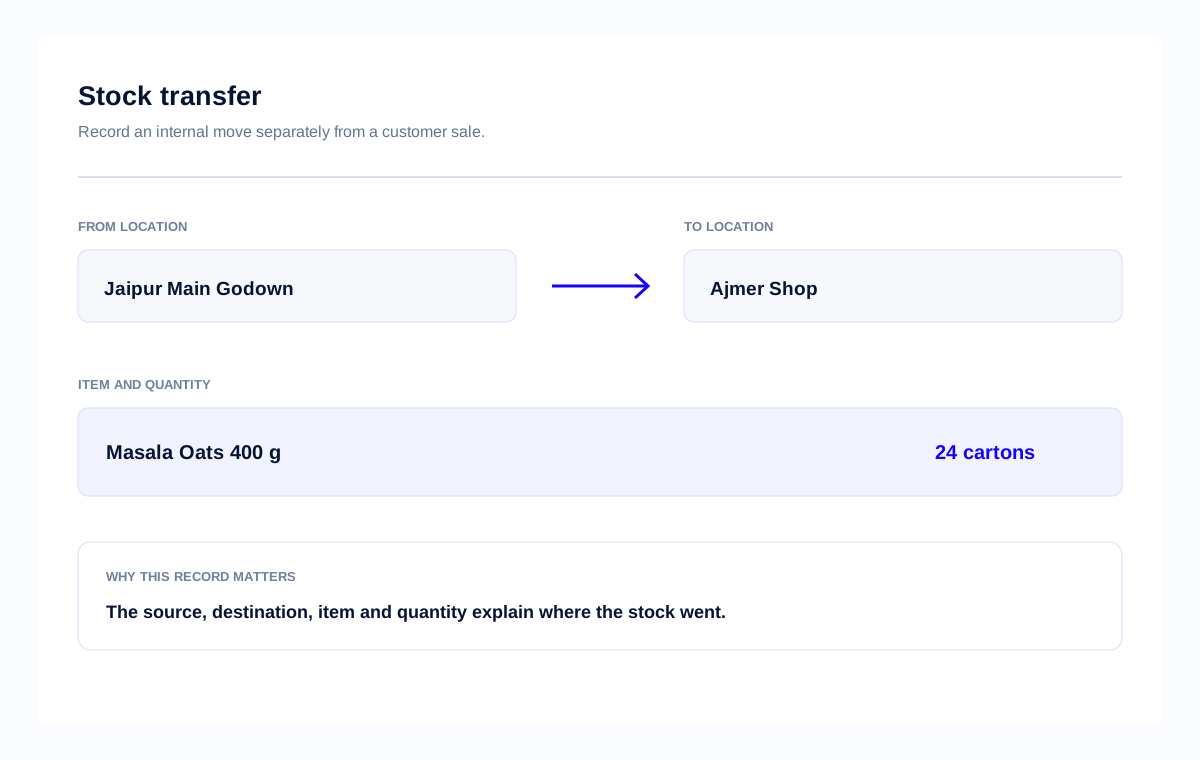
Record the store sending it, the store receiving it and the quantity.
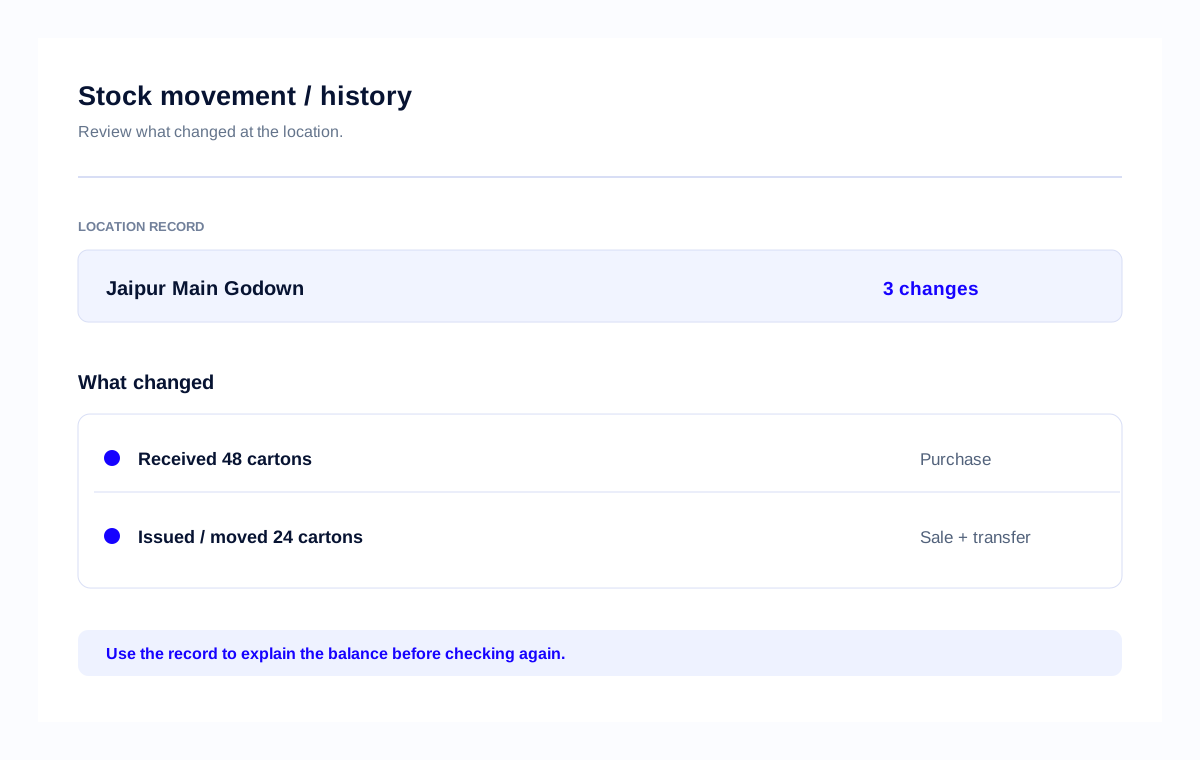
Check what came in, what went out and what is left.
A review from a multi-branch operator
One account, 3 branches and multiple people updating stock together — the problem this page helps solve.
Natwar Kumar
TechJockey · CEO, Gaming
2–100 employees · Reviewed Apr 10, 2026
Likely to recommend: 10/10
Customer review
techjockey.com/reviews/stock-register ↗“Best software for Online Stock Update multi branch.”
“I have been using Stockregister.in for the past 6 months across my 3 branches… the multi-user version allows different users in my organization to work simultaneously.”
3 branches
One account used across multiple locations.
Multi-user work
Different people can update stock together.
Simultaneous updates
People in the organisation can work at the same time.
Check the store before you say yes
The next step is clear: bill from Jaipur, move stock if another branch needs it, or tell the customer it is not ready.
Location
Jaipur Main Godown
Item
Masala Oats 400 g
On hand
72 cartons
ORDER
Sales notes Masala Oats 400 g and where the order should come from.
CHECK
It shows 72 cartons, so staff knows where to look.
SEND OR MOVE
If another shop needs the cartons first, move them before promising the order.
TELL THE CUSTOMER
The owner can see the current balance before confirming the order.
Tell the customer which store will send the cartons.
Test one real order
Use one real order. Can sales and store staff find which store has the cartons before saying yes?
Location
Jaipur Main Godown
Item
Masala Oats 400 g
Order
24 cartons
Start here
ADD
Add Jaipur Main Godown and Masala Oats 400 g with the unit you sell.
ENTER
Enter the 72 cartons and update it when you buy, sell or move cartons.
ASK
Have sales and store staff name the store that will bill or send the 24 cartons.
Then bill or send the order from that store.
Sales, store staff and owner: one answer
Sales names the sending store, store staff checks the stock number, and the owner gives the customer a clear yes, transfer or later answer.
Sales staff
Give the item, unit and store. Do not quote the total for every store.
Store or godown staff
Share the quantity you have and anything you still need to count.
Owner
Say yes, move the cartons, or say not today.
After you find the stock
Check the value, catch low stock or record a correction. Each check gives staff the number they need before the next order.
Three stock checks after you find the store.
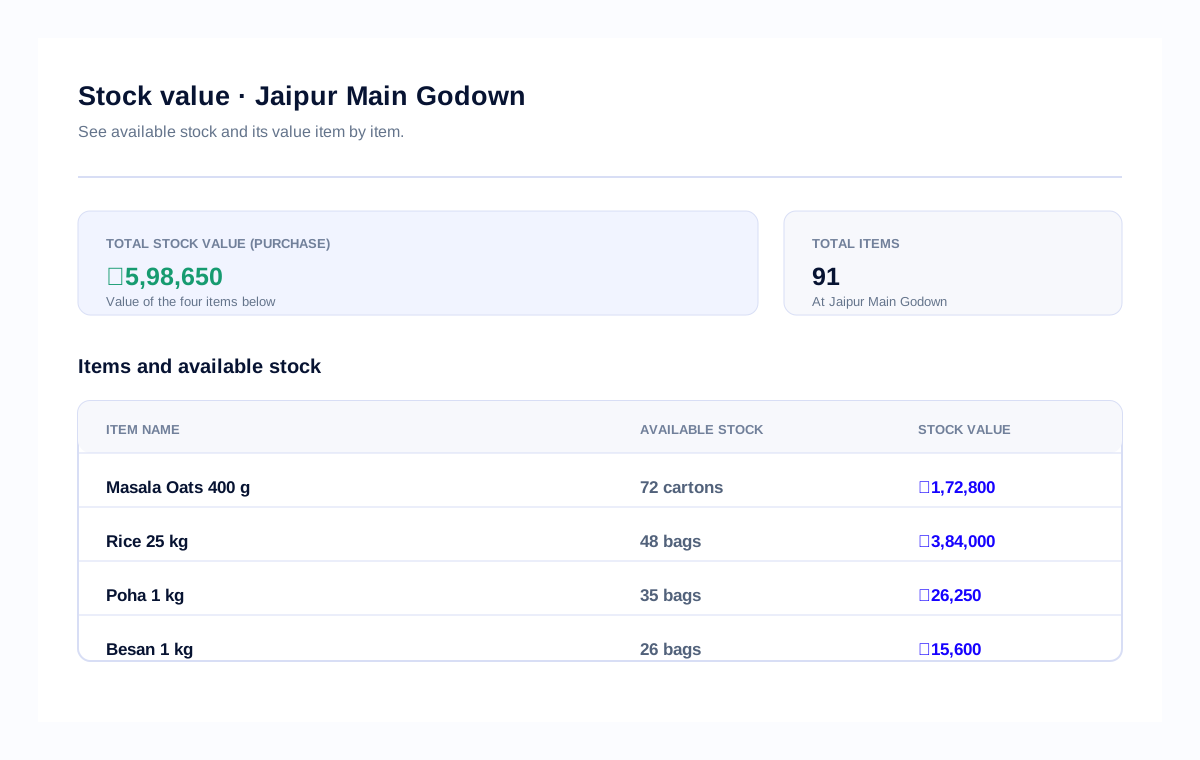
Check total stock value, available stock and the value of each item before you decide what to send.
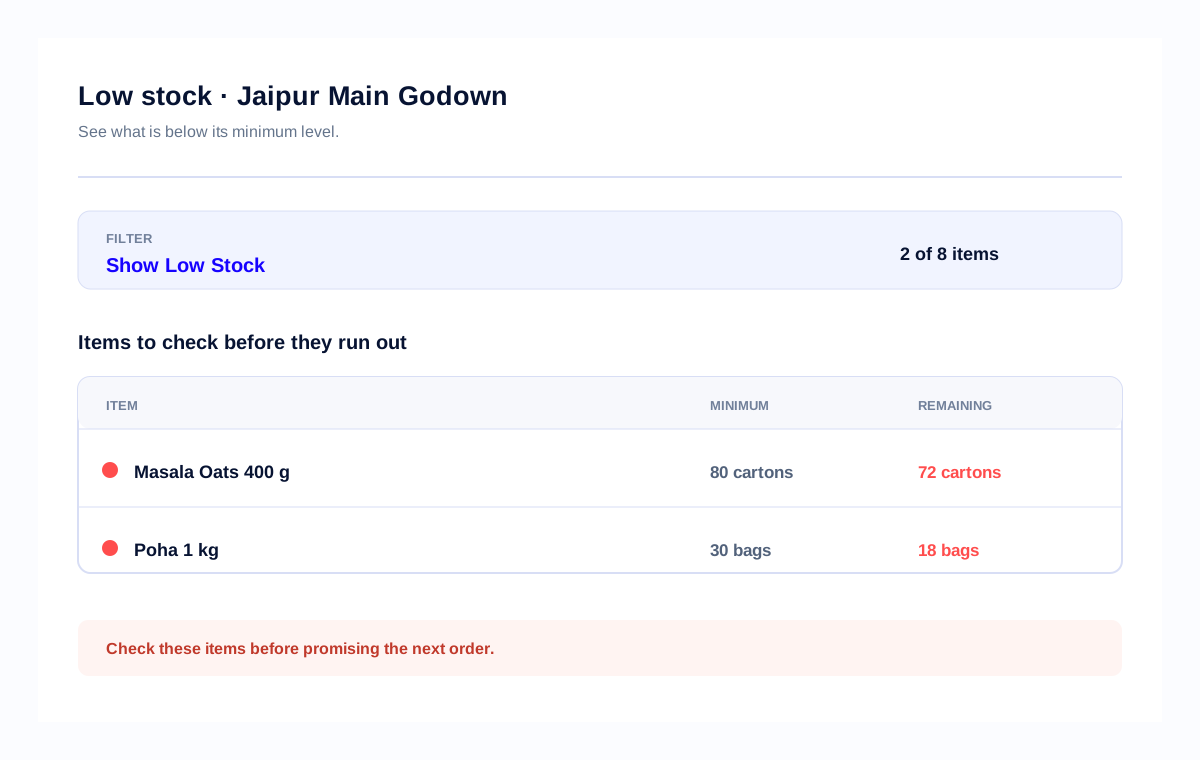
Filter items below their minimum so staff can reorder before they run out.
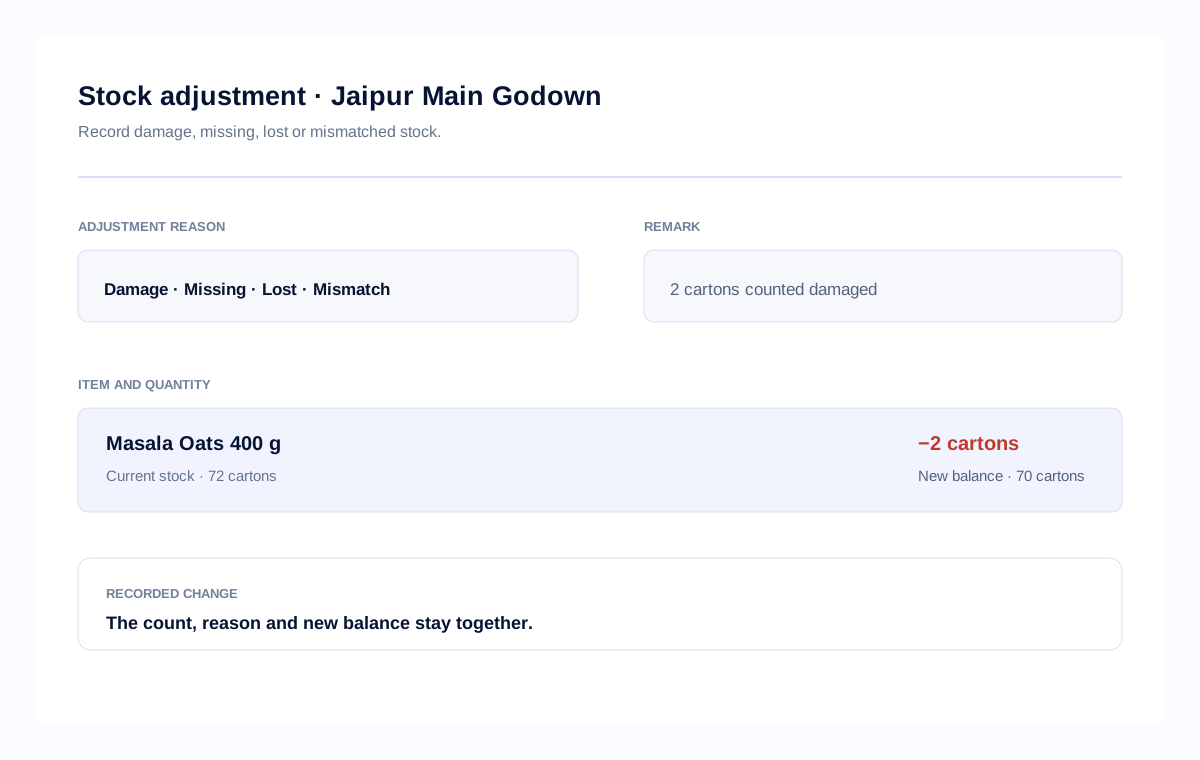
Record damage, missing, lost or mismatched stock with the quantity and reason beside the new balance.
When to use Stock Register
For multi-store inventory and stock tracking, check the store or godown that will send the order—not only the total stock across the business.
Use stock management totals to see how much you have. Use stock by store or stock by godown to find where the order can come from.
The stock is recorded in one notebook. Staff must ask before promising an order.
The sheet can miss the latest sale, bill or stock transfer.
It adds every store together. It does not say which store can send this order.
It shows the item, quantity and store or godown in one place.
For an order, check the store or godown that can send it.
Compare plans after your trial
Try your own items, stores and godowns first. Choose a plan after you know what your owner, counter and location staff need.
For a solo owner
₹3,000 / year
₹2,250 / year
1 User · excl. GST
Check your locations and units before you start
For a business operating across stores and godowns
₹4,800 / year
₹3,600 / year
Owner + 3 Staff (4 Users) · excl. GST
Check your locations and units before you start
For businesses that need more control
₹8,000 / year
₹6,000 / year
Owner + 3 Staff (4 Users) · excl. GST
Check that approval rules fit your staff before you start.
What Stock Register helps you do
Use Stock Register when staff needs stock by store, stock history and store records. It does not handle stock reservations, goods in transit or warehouse automation.
Good fit when you need
Choose another tool if you need
After you find the stock
For multi-store and multi-godown businesses, keep the owner, sales staff and store staff looking at the store or godown that holds the stock.
Before you start
Check the item at the store or godown that will supply it. Then check stock movement/history and record the source, destination, item and quantity if stock needs to move before you confirm the order.
It means checking stock at the shop, branch or godown that will supply the customer instead of promising from the total across the business.
Yes. Stock Register supports stock records by store, branch and godown so staff can check the quantity at the location that will supply the order.
Yes. Stock Register provides stock movement/history so the owner can check what came in, what went out and what remains at that location.
Yes. Record the sending location, receiving location, item and quantity as a stock transfer, separate from the customer sale.
Where your plan includes staff/store access, staff can work from the records assigned to their store. Try one location before giving access to more locations.
Yes. It helps when staff needs stock by store, branch or godown, stock movement/history and staff/store access on the plan. Check one location and staff setup before moving daily work.
No. Stock Register covers stock by location, movement/history and staff/store access where the plan includes it; it does not reserve stock or track goods in transit.
Yes. Start with one location, one regular item and one real customer order before adding more stores or godowns.
Yes. Stock Register works on Android and the web, so the owner and location staff can check the records from the devices they use.
Staff access depends on the stores and permissions assigned on your plan. Set up one location first and confirm the access each person needs.
No. A stock transfer records an internal move between locations; the customer sale remains a separate entry for the location that supplies the order.
Advance Plus includes the owner and 3 staff users with role-based access. Basic Plus is a 1-user plan, so compare the plans before assigning store staff.
Yes. Stock Register supports Android and web access with data sync across devices, so the owner and staff can check the same account from their devices.