Operational guide for Indian merchants
Stock Value Report: How to Check Inventory Value by Item and Godown
See how much money is tied up in stock by item, category and godown before buying more or closing the month.
For Indian retailers, wholesalers, distributors, FMCG stockists, pharmacies, food businesses, manufacturers and multi-location merchants.
QUICK ANSWERS
The three numbers to read first
What is stock value?
Stock value is the stock left multiplied by the price you choose. Purchase-price value shows money paid for stock; selling-price value shows what the same stock could be billed at before expenses.
How do I compare godowns?
Look at the same item and price basis for each godown, then total the locations. A high total in one godown may need a different action from a small value spread across several shops.
What should I do with a high-value line?
Check the unit, recent inward and outward entries, physical stock and the reason for holding it. Then decide whether to investigate, hold the next purchase, move stock for a known order or discuss it with the team.
A stock value report shows how much money is tied up in the stock you have left: calculate each item’s remaining quantity × its purchase price, then compare the totals by category and godown before buying more. You can also look at selling-price value when you want to understand the value at current selling prices.
You may also see this called an inventory value report or stock valuation report. When the focus is one location, a godown stock value report simply means the same calculation for that godown rather than the whole business.
This is useful at month-end, before a large supplier order, or when a business has stock in a main godown, branch and shop. A retailer may find that one category is taking most of the cash. A wholesaler or FMCG stockist may find that the value is sitting in the source godown rather than the branch that needs it. A pharmacy, food business or manufacturer may need to inspect a high-value line before more stock comes in.
Use the total alongside the inventory purchase planning guide before accepting a larger inward. If the value is high because goods are nearing their date, compare it with the expiry-date stock guide.
What a stock value report tells you
The report should answer four plain questions:
- Which items have the most money in them?
- Which category carries most of the stock value?
- Which godown, branch or shop is holding it?
- What needs checking before the next purchase, dispatch or month-end close?
Quantity alone does not tell you the money tied up in stock. Ten cartons of a ₹2,000 item and 200 pieces of a ₹40 item are very different positions. Read the quantity and price together.
Purchase-price value and selling-price value answer different questions. Purchase-price value is closer to the money paid for the stock still left. Selling-price value shows what that stock would be billed at using the selling price entered for the item. Keep both totals separate when you discuss the report with your CA, partner or team.
How to calculate stock value by item
Use this calculation for each item:
Stock value = stock quantity left × price used for the report
For example, if 40 cartons remain and the purchase price is ₹850 per carton:
40 × ₹850 = ₹34,000 purchase-value stock
If the selling price is ₹1,000, the same quantity has a selling-price value of ₹40,000. The second number is not profit: it does not subtract GST, expenses, discounts, damage or the cost of selling.
Keep the unit consistent. Do not multiply cartons by a piece price unless you first convert the quantity. If your business buys in boxes but sells in pieces, note which unit the report is using before comparing two lines.
Start with the item list, then group it by category
At month-end, sort or scan the item rows from the highest purchase value down. Mark the lines that deserve a closer look:
- A high-value item that has not moved as expected.
- An item whose quantity or unit looks wrong.
- A category that has grown because several purchases arrived together.
- A line that is high in selling-price value but has a very different purchase-price value.
Category totals make the list easier to discuss. For example, a hardware shop may separate electrical goods, plumbing, tools and fasteners. A pharmacy may separate prescription medicines, over-the-counter medicines and personal care. A food business may separate raw ingredients, packaged goods and finished items. A manufacturer may separate raw material, packing material and finished goods.
The category total is a way to group the item values. It does not tell you whether that category is good or bad by itself. Ask what the stock is for, when it is needed and whether the quantity and price records match the bills.
The same stock can look different across godowns
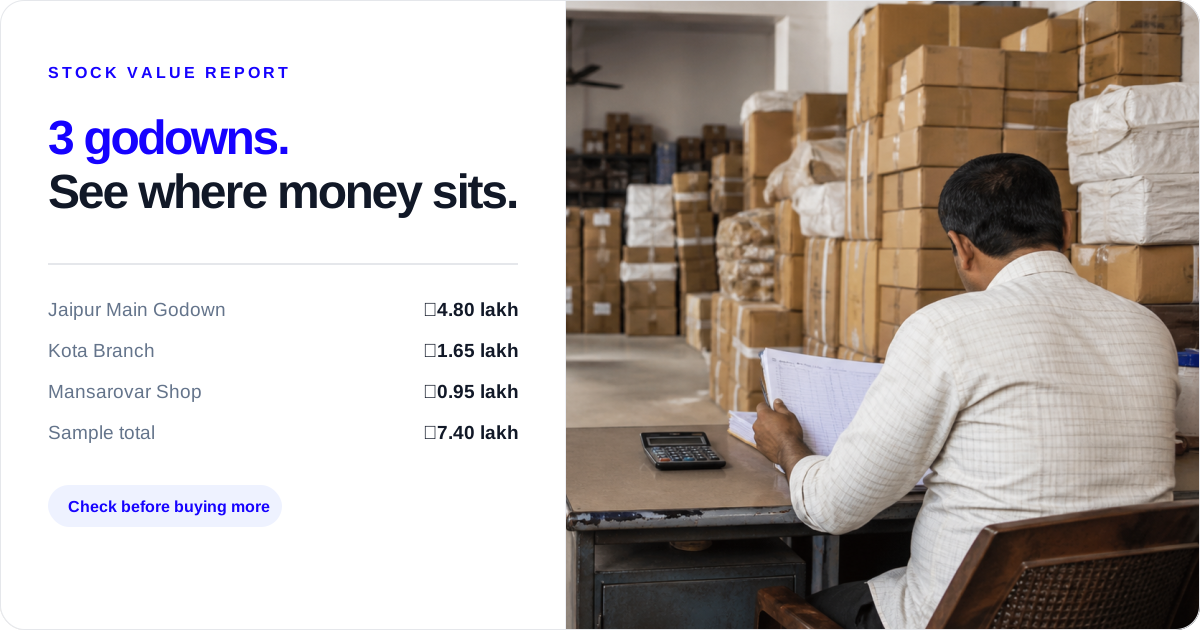
Suppose a business has a Jaipur Main Godown, Kota Branch and Mansarovar Shop. The following are Sample figures, created to show how a location comparison works:
| Location | Sample stock value at purchase price | What to ask next |
|---|---|---|
| Jaipur Main Godown | ₹4,80,000 | Which high-value items are waiting for branch orders or the next dispatch? |
| Kota Branch | ₹1,65,000 | Is the branch carrying the range it needs, or is value tied up in a few slow lines? |
| Mansarovar Shop | ₹95,000 | Are shop quantities matched to local demand and the next collection? |
| Business total | ₹7,40,000 | Compare the total with the purchase list and known orders. |
The total is useful, but it is not the whole answer. If a retailer order must leave Kota, the Jaipur total cannot be treated as Kota’s available stock. If the main godown has most of the value, check whether it is there for a known branch order, a planned production run or a purchase that should be paused.
For a single-location retailer, the same check happens inside one shop: compare categories and high-value items, then inspect the lines that need an explanation. For a distributor, the location comparison may decide whether to move stock for a known order or ask the supplier for a different purchase mix. For a manufacturer, the question is whether the value in raw material and packing material matches upcoming production needs.
How to use Stock Register to see recorded value
Stock Register’s current Stock Valuation evidence supports these recorded views:
- The item page can show total stock value at purchase price and selling price, with item rows for remaining stock, purchase price, selling price and the related stock values.
- All Store Items can show combined stock value across stores, while Store Wise Items lets you look at a particular store or godown.
- The item’s Stock Value tab can show purchase-wise stock value. Where the FIFO method is used, FIFO means First In, First Out: older purchase entries are considered first. The same area can show average purchase price from purchase entries.
- Stock summary and item movement/history can help you inspect recorded inward, outward and remaining stock. Current stock-tracking evidence also documents date-range and category/godown filters in the supported stock summary view.
- The stock valuation product page documents a downloadable stock value report. Check the current screen and your plan for the available report action.
If you want the difference between FIFO and LIFO explained side by side, read FIFO vs LIFO. This guide uses FIFO only to explain one stock-value view; its main job is the item, category and godown check before buying more or closing the month.
These are recorded numbers from your entries. They are not a physical count and they do not decide what you should buy or move.
A simple month-end stock value check
Use the same order every month so the comparison is useful:
1. Set the date and price basis
Write down the date of the report and whether you are reading purchase-price value, selling-price value, average purchase price or purchase-wise FIFO value. Do not compare a purchase-price total this month with a selling-price total from last month.
2. Read the business total
Start with the combined figure to understand the broad amount tied up in stock. Treat it as a starting point, not as a reason to place or cancel a purchase on its own.
3. Find the largest item and category lines
Look at the top-value items and categories. Check their units, purchase prices, latest inward entries and recent outward entries. If one purchase changed the value sharply, keep the supplier bill nearby.
4. Compare godowns and shops
Switch from the combined view to each godown, branch or shop. Ask where the value sits and whether that location has a known order, dispatch, production need or local customer demand.
5. Investigate exceptions with the team
Discuss unusual lines with the person who buys, receives, stores or sells the item. Check the bill, unit, recorded movement and physical stock where needed. If the record and the shelf do not agree, investigate the difference before changing the record.
6. Write the next action beside the line
Use plain actions: investigate, hold the next purchase, move stock for a known order, or discuss the item mix with the team. Add the owner and date if someone needs to follow up.
What to do when the value looks high
A high value is a signal to ask a better question, not proof that the item is a problem.
- If the quantity is high and outward movement is low, check the reason for holding it and whether the next purchase can wait. Use the slow-moving stock decision guide when the value report has identified a line that needs a keep, move, return or stop-order decision.
- If the value is high in one godown, check known branch orders, dispatch plans and the source balance before moving anything.
- If the purchase value and selling value are far apart, confirm the price, unit, tax treatment and the price basis used in the report. Do not call the difference profit without a proper profit calculation.
- If the same item appears under different units or names, standardise the comparison before adding the rows.
- If the recorded value is unexpected, trace the recent inward and outward entries and then compare with a physical check.
The next step may be to hold a purchase, move stock for a known order, or discuss the category with the team. The report supports that conversation; the owner or manager makes the call.
What retailers, wholesalers and other businesses should inspect
Different businesses reach for a stock value report at different times:
- Retailer or medical shop: before a month-end purchase, compare high-value shelves with the next local demand. Check item units and any separate expiry or quality routine your shop follows.
- Wholesaler or FMCG stockist: before buying a supplier scheme or full case quantity, compare category value and godown value. Check whether the stock is already at another location or tied to a retailer order.
- Distributor with branches: before promising dispatch, check the value and quantity at the branch that will supply the order. A combined total does not mean every branch has that stock.
- Food business: before the next inward, check the value of ingredients and packaged goods by storage location. The team still needs its own shelf-life and quality checks.
- Manufacturer: before a production run, compare raw material and packing-material value with the planned requirement and the plant-store balance. The report does not create a production plan.
- Multi-location merchant: at month-end, compare location totals with transfers and known orders. A large central value may be correct, or it may point to a mix that needs discussion.
A short capability boundary
Stock Register can show recorded stock value at purchase and selling price, item rows, combined store totals and store-wise views where supported. The recorded purchase, sale and movement details can help you trace how a number was formed.
The owner, CA, staff or godown team must still check bills, units and physical stock and decide what action is suitable. A stock value report does not replace reconciliation, approvals, forecasting, automatic buying decisions or a physical count.
Common mistakes in a stock value report
Mixing price bases
Purchase-price value and selling-price value are both useful, but they should not be added together or compared as if they mean the same thing.
Ignoring location
A combined ₹7.40 lakh does not tell you whether the shop serving today’s order has the item. Read each godown before you promise a dispatch or plan a transfer.
Adding quantities with different units
Cartons, boxes, pieces, kilograms and litres need a clear conversion or separate comparison. A wrong unit can make a correct price look like a wrong stock value.
Treating a high total as profit
Stock value is the value of stock left using a chosen price. Profit needs sales, cost and other relevant figures; do not use the stock total as a profit number.
Changing records before checking the cause
If the number looks wrong, inspect the purchase bill, item, unit, inward, outward and physical stock first. A quick change can hide the reason for the difference.
Daily and monthly checklist
Before buying more
- Check the combined stock value at the chosen price basis.
- Find the largest item and category values.
- Compare the godown or shop that normally receives the purchase.
- Check whether usable stock is already at another location.
- Match unusual lines to recent purchase and sales movement.
- Write whether the next step is investigate, hold, move for a known order or discuss.
At month-end
- Save the report date and price basis.
- Check purchase-price value and selling-price value separately.
- Compare each godown, branch and shop with the business total.
- Confirm units and prices for high-value items.
- Check a sample of high-value lines against bills and physical stock.
- Share exceptions with the owner, CA, buyer or godown team.
Turn the number into the next action
| What you see | Check first | What to do next |
|---|---|---|
| High value in one item | Unit, purchase bills, stock left and recent outward | Investigate the line before buying more |
| Value sits in the wrong godown | Source balance, known order and transfer timing | Move stock for the order or discuss the source with the team |
| One category takes most of the value | Item mix, customer need and next purchase list | Hold the next purchase until the mix is understood |
High value in one item
- Check first
- Unit, purchase bills, stock left and recent outward
- What to do next
- Investigate the line before buying more
Value sits in the wrong godown
- Check first
- Source balance, known order and transfer timing
- What to do next
- Move stock for the order or discuss the source with the team
One category takes most of the value
- Check first
- Item mix, customer need and next purchase list
- What to do next
- Hold the next purchase until the mix is understood
What Stock Register records
- Stock Register can show recorded stock value at purchase and selling price, item rows, combined store totals and store-wise views. Its item and stock screens also provide recorded purchase, sale and movement details where supported.
The owner, CA, staff or godown team still needs to check bills, units and physical stock and decide what action is suitable.
Related resources
Frequently Asked Questions
What is a stock value report?⌄
A stock value report shows the money tied up in stock left at a stated time. It normally lists each item, quantity, price and value, and can be grouped or compared by category or godown when those fields are available.
How do I calculate stock value by item?⌄
Multiply the quantity left by the price basis you are using. For example, 40 cartons at ₹850 purchase price gives ₹34,000 purchase-value stock. Add the item values to get a category, godown or business total.
Should I use purchase price or selling price?⌄
Use purchase price to understand money paid into the stock you still hold. Use selling price to understand the billed value at current prices. Keep the two totals separate because they answer different questions.
Can I see stock value for each godown?⌄
Yes, where the stock view supports store-wise records, check each godown or shop separately and compare it with the combined total. Stock Register’s valuation evidence includes Store Wise Items and All Store Items views.
How should a pharmacy or food business use the report?⌄
Group high-value medicines, ingredients or packaged goods by shop or godown, then check purchase dates, unit, physical quantity and near-term customer or production need with the responsible team. A value report does not replace any separate expiry or quality check.
Does a stock value report replace a physical stock check?⌄
No. It shows the recorded quantity and value. Count or sample-check the physical stock, match the unit and investigate any difference before changing the record or placing a large purchase.