Wholesale stock decision guide
What to Reorder in a Wholesale Business: Reorder, Transfer or Wait?
A five-action wholesale stock decision guide: choose whether to reorder, transfer, wait, reduce or investigate after checking movement, units, godown stock, value and known need.
For Indian wholesalers, distributors and FMCG stockists managing stock across shops, branches or godowns.

QUICK ANSWERS
What to check before you reorder
What comes first?
Check the same item and unit at every shop, branch and godown before opening a purchase.
What does low stock mean?
It means the recorded balance needs attention; the next action may be a reorder, transfer, wait, reduce or investigate.
What stops wrong-unit buying?
Match the supplier unit, item record, recent sales and physical count, then convert cartons, cases and pieces to one base unit.
To decide what to reorder in a wholesale business, check the item, selling unit, stock at every godown, recent sales, recent purchases, stock value and known orders together. Then choose one action for each line: reorder, wait, reduce, transfer or investigate. A low number at one branch is not enough reason to buy if the same cartons are already available at your main godown.
The useful question is not “Which items are low?” It is “Which item will be short at the location that must sell or dispatch it before the next purchase can arrive?” That question keeps a wholesaler from buying a slow variant, duplicating stock already on hand, or sending a purchase to the wrong godown.
Use this guide after a low-stock view, supplier call, retailer order or weekly buying review has produced a candidate line. It answers the next question: is this line a reorder, transfer, wait, reduce or investigate case? It does not set a low-stock threshold, calculate a target purchase quantity, or explain how to set up every godown. For those jobs, use the low-stock guide, inventory purchase planning guide or multi-godown guide.
The reorder pressure changes by business
The same low balance creates a different job for each person who handles stock. Start with the pressure in front of you, then use the five actions consistently.
When the wholesaler is deciding what to buy
The buyer is usually looking at a supplier list, a minimum order, or a rate that is attractive only if the business takes more cases. The buyer's question is whether the next purchase will cover a real need without adding another slow variant. Compare the item's pack, recent outward movement, stock value and known retailer orders before accepting the supplier quantity.
Example: a supplier offers 50 cases of tea, but the retailer orders due this week total 18 cases and the main godown already has 24. Mark the line wait or reduce until the next buying check instead of accepting the full offer just because the rate is lower.
When the distributor is trying to make tomorrow's dispatch
The route or dispatch person has a time problem, not just a stock problem. A branch may show a shortage while the main godown has enough stock, but a transfer is useful only if the source can spare it and the cartons can reach the branch before the route leaves. Check the source location, physical quantity, dispatch cut-off and customer promise before choosing transfer or purchase.
Example: a Noida branch needs 12 cases for tomorrow's route, while Delhi shows 20. If 15 Delhi cases are already promised to another route, only 5 are available to transfer; record the shortfall as a reorder or customer-promise issue instead of calling the whole 20-case balance available.
When an FMCG stockist is carrying too many pack variants
The stockist can have a healthy total for a brand while one fast-selling pack is short and another pack is sitting. Read each item and pack separately. Use recent outward movement and recorded value to find the line that deserves a purchase; check price, condition and any date-sensitive stock physically before adding another case. The brand total is not a reorder decision.
Example: the 500 g biscuit pack has 3 cases left and 24 cases moved in 14 days, while the 1 kg pack has 22 cases left and only 2 moved. The first line may be a reorder; the second may need reduce or investigate after checking price, date and condition.
When the owner runs a multi-location buying review
The owner needs one action per line that can be handed to a buyer, godown worker or branch manager. Put the location, unit, quantity, reason and next check date beside the action. The owner approves the business choice; the buyer places the purchase, the godown team counts and moves cartons, and the receiving branch confirms what came in.
Example: the owner writes “Cooking oil 1 L — Delhi — reorder 12 cases — buyer — check Friday” and “Tea 250 g — Noida — transfer 12 cases from Delhi — godown team — confirm on receipt.” Each person gets one line, one owner and one follow-up date.
This division prevents one common mistake: asking Stock Tracking to answer a question that belongs to the team. The saved record helps the right person start with the item and location; the team still decides whether to buy, transfer, wait, reduce or investigate.
Start with one item, one unit and one location
Make the reorder list readable before you discuss quantity. Write the item name, pack or selling unit, location that needs it, date of the check and the next date when you will check it again. Keep cartons, cases and pieces separate until the pack relationship is confirmed.
For every line, collect these fields:
- Stock left by location: include the shop, dispatch branch and every godown that can supply the order.
- Recent sales or outward movement: use the same period for all comparable items, such as the last 14 or 30 days.
- Recent purchases and returns: note what came in, what went back and whether a purchase is still waiting to be received.
- Known requirement: include a retailer order, route dispatch, branch requirement or an upcoming selling occasion that is already real.
- Unit and pack: write “carton”, “case”, “piece”, “kg” or “litre”, and the conversion if one carton contains a fixed number of pieces.
- Money tied up: check stock value before adding more to a line that already holds a large amount of cash.
This is a business check. In Stock Tracking, the saved movements and remaining stock give the team a starting record; the team still checks the physical cartons, open cases, supplier bill and actual location before placing the order.
Read movement before you call an item fast or slow
Recent sales help you see what is moving now; they do not make a promise about the next month. Compare items in the same unit and period. A fast-moving 1-litre oil carton and a slow-moving 5-litre tin should not be blended into one “oil” total if customers buy them differently.
Use three simple labels:
- Fast-moving: regular outward movement and a short time before the next sale or dispatch. Check whether the location can cover the next buying period.
- Low-stock: the recorded balance is near the minimum you use for that item or is already below the quantity needed for a known order. Check all locations before buying.
- Slow-moving: little or no recent outward movement, or stock that has sat through more than one buying check. Check price, pack, season, expiry, customer demand and location before adding more.
In Stock Register, open Stock Tracking to review the saved stock summary and item ledger. Use the low-stock, dead-stock or inventory-aging views where they are available in your plan. These views help you find lines to discuss; they do not choose a purchase quantity or forecast demand for you.
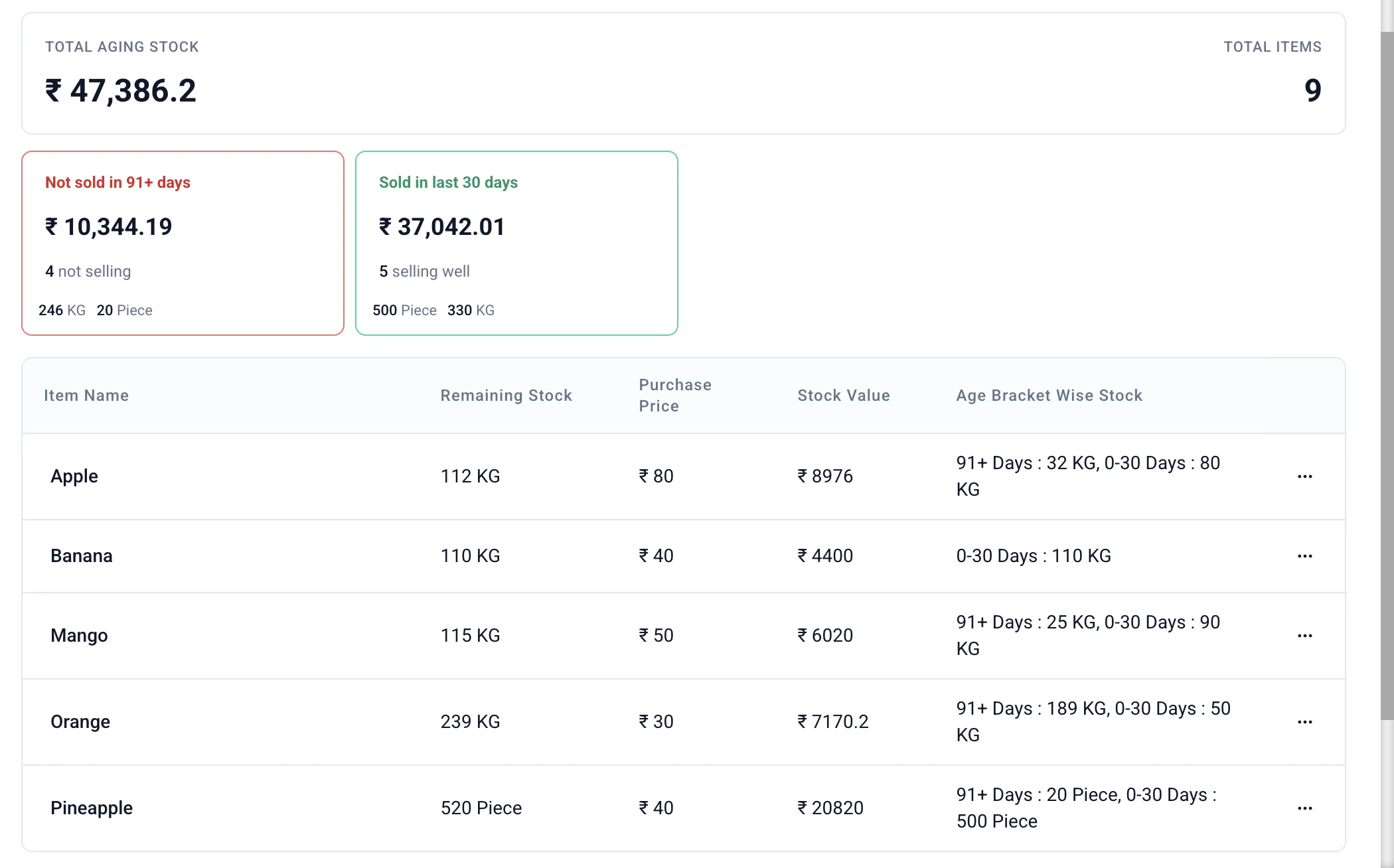
Product proof: this Stock Tracking report shows total aging stock, sold/not-sold summary cards, remaining stock, purchase price, stock value and age-bracket stock by item. The buyer still checks the item, unit, physical cartons and next requirement before reordering.
A low-stock line still needs an action
Suppose the Noida dispatch godown has 18 cases of a biscuit, the Delhi main godown has 70, and a retailer order needs 24 cases from Noida tomorrow. The business has 88 cases in total, but the low line does not tell the buyer whether to purchase.
Check the source godown after its own orders, dispatch time and physical count. If Delhi can spare 6 cases, the next action is a transfer, not a fresh purchase. If Delhi cannot spare them or cannot reach Noida in time, the line becomes a reorder or a customer-promise problem. Record the internal movement separately from the retailer sale so the location balances explain what happened.
Use Stock Transfer when stock actually moves between your locations. In Stock Register, the saved transfer records the source, destination, item and quantity, and updates the recorded source and destination balances when the transfer is saved; your team still confirms the cartons sent, received and stored.
Cartons, cases and pieces: stop a wrong reorder before it starts
A reorder list fails quickly when the purchase unit and selling unit are mixed. If 1 case contains 24 pieces and the godown has 9 cases, write both 9 cases = 216 pieces. Do not compare 9 with a piece-level sales number without converting them first.
Before ordering, match:
- the supplier's unit on the quotation or bill;
- the unit used in the item record and stock balance;
- the unit used in recent sales; and
- the unit the godown team counted physically.
If the printed pack changes from 24 pieces to 20, stop and investigate the item setup and old stock before multiplying anything. Use stock unit conversion for the detailed carton-to-piece routine.
Use stock value to control the size of the next buy
Quantity tells you how many units are left. Stock value tells you how much money is already tied up in those units. Before accepting a supplier minimum or a larger case quantity, check the item's purchase-price value and its location-wise value. A low piece count can still represent a large cash commitment when each case is expensive.
Use Stock Valuation to compare recorded purchase-price value, selling-price value and store-wise or combined views where supported. Keep the two price bases separate. A high value is a reason to ask what is moving, where it is held and when it is needed—not proof that the item should be written off or reordered.
Worked example: five lines, five different actions
The following sample figures are for one distributor's weekly reorder meeting. All quantities use cases, and the next purchase can arrive in seven days.
| Item / location | Stock / 14-day outward | Need | Value | Action and reason |
|---|---|---|---|---|
| Tea 250 g — Noida | 12 / 30 cases | 24 cases | ₹18,000 | Transfer — Delhi has 40 cases; move 12 after checking its own route. |
| Tea 250 g — Delhi | 40 / 26 cases | 10 cases | ₹60,000 | Wait — enough for the next need after the transfer; recheck next week. |
| Biscuits 100 g — Jaipur | 6 / 4 cases | 0 cases | ₹7,200 | Reduce — low recent movement and no known order; do not accept extra cases yet. |
| Cooking oil 1 L — Delhi | 3 / 24 cases | 12 cases | ₹21,600 | Reorder — the next need is higher than stock left and no other godown can spare it. |
| Detergent 1 kg — Noida | 20 / 0 cases | 0 cases | ₹44,000 | Investigate — high value with no recent outward; check unit, shelf, price and customer demand. |
The key is the action beside the line. “Low stock” describes a condition; it does not tell the buyer whether to purchase. The action comes after checking location, movement, unit, value and the next real requirement.
When the meeting is over, save the useful record of what happened: a purchase inward for goods bought, a transfer for goods moved between your locations, or a correction only when the team has confirmed a non-sale or non-purchase difference. A bill records a transaction; inventory control also asks where the goods are, what unit they are in and whether the next order can be supplied.
Turn a candidate line into one clear action
Run this short action test after a line has already come onto the reorder discussion:
1. Confirm what made the line a candidate
Write down the trigger: a low balance, a retailer order, a supplier call, a slow line, a value concern or a record mismatch. Do not let the trigger decide the action by itself.
2. Remove duplicate buying
Search the item across shops, branches and godowns. Check open customer orders and stock already set aside by your team. If usable stock is at another location, compare transfer time and source demand before opening a new purchase.
3. Separate genuine shortage from a record problem
Compare the item, unit, location and latest sales, purchase, return and transfer entries. If the screen says 20 cases but the godown finds 12, investigate the entry and physical count before buying to cover a number that may be wrong.
4. Mark the movement and value
Use recent outward movement to spot fast and slow lines. Use stock value to notice cash tied up in expensive or inactive stock. Keep short-expiry or quality checks with the person responsible for them; a reorder screen cannot decide whether goods are saleable.
5. Choose one of five actions
Write the owner and review date beside the action. A buyer can then place a focused order, a godown worker can prepare a transfer, and the owner can follow up on an unexplained line.
The five actions: reorder, wait, reduce, transfer or investigate
Reorder when the location will be short before a new purchase can reach it, no other godown can supply the need, the unit is confirmed and the quantity fits the next known requirement. Once you decide to buy, see the purchase-order page for small businesses in India to keep the supplier, item lines, quantities and rates together for receiving staff and accounts. Stock changes only after the received purchase bill is saved, not when the PO is saved.
Wait when stock covers the next buying period or a purchase is already on the way and correctly assigned. Put a review date beside the line instead of relying on memory.
Reduce when movement is slow, value is building or the supplier's minimum would leave too much stock. Discuss a smaller mix, return or clearance route with the supplier or sales team where that is part of your business practice.
Transfer when one location is short and another has usable stock after its own orders. Record the movement and check the receiving balance after the cartons arrive.
Investigate when the quantity, unit, location, value or movement does not make sense. Start with the latest bill, item record, physical count and ledger; do not purchase around an unexplained number.
What the buyer should hand to the godown team
The buyer's list should not say only “buy detergent” or “send tea.” Hand over the item, unit, quantity, source or receiving location, reason, supplier or internal movement, and the date to check again. The godown team confirms the printed pack, picked quantity, physical condition and receiving location.
When your team records a purchase, sale, return, transfer or adjustment in Stock Register, the saved item movement, location balance and transaction history stay together. The record does not replace the physical count, supplier conversation, quality check or decision about how much cash the business should commit.
Weekly reorder worksheet
Copy this row for every item discussed:
| Field | Write this down | Example |
|---|---|---|
| Item and selling unit | Name, pack size and base unit | Tea 250 g / case |
| Location needing stock | Shop, branch or godown | Noida dispatch godown |
| Stock at all locations | Quantity by location, in the same unit | Noida 12; Delhi 40 cases |
| Recent outward | Date range and quantity sold or dispatched | 30 cases in 14 days |
| Recent inward and returns | What came in or went back | 10 received; 2 returned |
| Known need | Order, route, branch or production requirement | 24 cases for Friday route |
| Stock value | Purchase-price value and price basis | ₹18,000 at purchase price |
| Unit check | Carton/case/piece conversion and physical count | 1 case = 24 pieces; count 12 cases |
| Action | Reorder / wait / reduce / transfer / investigate | Transfer 12 from Delhi |
| Owner and next check | Name, date and follow-up | Amit; check Friday 5 pm |
Common mistakes
Ordering from the combined total
The business total can look healthy while the dispatch location is short. Read location-wise stock before promising a retailer order.
Treating a low-stock view as a purchase list
A low balance can need a transfer, a unit correction, a count or a purchase. Open the item's movement and location details first.
Buying the case instead of the item mix
Supplier discounts and full cases can hide slow variants. Write the exact pack and compare recent outward movement for each item.
Ignoring value because the quantity is small
Three expensive cases can hold more cash than dozens of low-priced cases. Check value before accepting a large minimum.
Reordering around a mismatch
If the recorded balance and physical stock disagree, buying more may make the explanation harder. Investigate the item, unit, location and movement first.
| Situation | Check first | Next action |
|---|---|---|
| Location will be short before new stock can arrive | Other godowns, unit, known need and supplier timing | Reorder the smallest workable quantity |
| Stock covers the next buying period | Recent outward and any inward already on the way | Wait and write the next check date |
| Movement is slow or value is building | Last outward, pack, value and supplier minimum | Reduce, clear or pause the next buy |
| One location is short and another has usable stock | Source balance, physical cartons and travel time | Transfer and record the movement |
| Recorded number does not match the work | Bill, item, unit, location, ledger and physical count | Investigate before buying around it |
Location will be short before new stock can arrive
- Check first
- Other godowns, unit, known need and supplier timing
- Next action
- Reorder the smallest workable quantity
Stock covers the next buying period
- Check first
- Recent outward and any inward already on the way
- Next action
- Wait and write the next check date
Movement is slow or value is building
- Check first
- Last outward, pack, value and supplier minimum
- Next action
- Reduce, clear or pause the next buy
One location is short and another has usable stock
- Check first
- Source balance, physical cartons and travel time
- Next action
- Transfer and record the movement
Recorded number does not match the work
- Check first
- Bill, item, unit, location, ledger and physical count
- Next action
- Investigate before buying around it
What Stock Register records for this check
- In Stock Register, purchase, sale, return, transfer and adjustment entries keep saved movement tied to the item and location used on the entry.
- In Stock Tracking, the saved stock summary and item ledger, plus low-stock, dead-stock and aging views where supported, help surface lines that need attention.
- In Stock Valuation, recorded purchase-price and selling-price values can be viewed by item and across store-wise or combined views where supported.
The buyer and godown team still count cartons, confirm units and locations, inspect condition, check supplier timing and decide the purchase quantity. Stock Register does not forecast demand or place an automatic reorder.
Related resources
Frequently Asked Questions
How do I choose between reorder, transfer, wait, reduce and investigate?⌄
Check recent outward movement, stock left at each location, known orders, supplier timing, unit conversion and stock value. Choose reorder only when the location will be short and another godown cannot supply the need in time; choose transfer when another location can supply it; wait when the next need is covered; reduce when movement or value is weak; and investigate when the record or physical count does not make sense.
Should I reorder low-stock items automatically?⌄
No. A low-stock line is a prompt to check the item, location, unit and next requirement. The right action may be to reorder, transfer, wait, reduce or investigate. In Stock Register, the saved stock and movement details support that check; they do not decide the purchase for you.
When is a low branch balance not a new purchase?⌄
It is not a new purchase when another godown has the same item and unit, can spare it after its own orders, and can reach the short branch before the need date. Record the internal movement when the cartons actually move. If the source cannot spare or reach them, return to the reorder decision.
How should a wholesaler handle cartons and pieces while reordering?⌄
Choose one base unit for comparison and write the pack conversion beside it. If 1 case has 24 pieces, 9 cases means 216 pieces. Match the supplier bill, item record, sales and physical count before choosing the order quantity.
Can Stock Register show fast-moving and slow-moving items?⌄
In Stock Register's Stock Tracking view, the saved stock summary, item ledger, low-stock, dead-stock and aging views can help you find lines that need attention where those views are available in your plan. You still compare the dates and quantities with the business need and decide what to do.
Does stock value tell me what to reorder?⌄
No. Stock value shows the money tied up in recorded stock at a chosen price basis. Use it with movement, location, unit and known need. A high-value line may need a pause or investigation, while a low-value fast mover may need a purchase.
What does investigate mean before reordering?⌄
Compare the latest bill, item name, unit, location, ledger movement and physical count. Check whether a return, transfer, adjustment or wrong item entry explains the number. Correct or record the confirmed issue before buying around a balance that may be wrong.
What is the first useful step in Stock Register?⌄
Open Stock Tracking in Stock Register and review one real item by location, unit and recent movement. Then compare that saved record with the physical stock before recording a purchase, transfer or correction. Start with the item that is causing the next buying decision.