Slow stock decision guide
What to Do With Slow-Moving Stock Before You Buy More
A practical guide for Indian shop and godown owners deciding whether to keep, move, return or clear stock before the next purchase.
For Indian merchants checking stock that is not selling before they place the next purchase.

QUICK ANSWERS
Start with the stock problem, not the purchase list
Should I buy more stock that is not selling?
Pause the fresh purchase until you check the item, unit, last movement, location, condition and any customer or supplier reason. Slow stock may be misplaced, seasonal, short-dated, damaged or genuinely unwanted.
What is the first thing to do with slow-moving stock?
Count the real saleable quantity and compare it with the recorded item and location position. Then choose one owner for the next action: move it, return it, sell it differently, write off the loss or stop ordering.
Is slow stock the same as dead stock?
No. Slow stock has some movement; dead stock has no movement in the period you choose. A seasonal item, short-expiry batch, damaged carton or wrongly located item needs a different check.
If stock is not selling, pause the next purchase and first check the exact item, unit, last movement, location, physical condition and reason it is sitting; then choose whether to keep it, move it, return it, sell it differently, write off the loss or stop ordering it.
Why stock stops moving before the purchase list shows it
Stock can sit for a simple reason: customers are not asking for it. It can also sit because the item is hidden, wrongly named, in the wrong unit, stored at a location that cannot serve the right buyers, bought for a season that has not arrived, or no longer in saleable condition. A fresh purchase can make that original mistake larger.
Before calling the line “slow-moving stock”, write down five facts:
- the exact item, pack, size, model or strength;
- the selling unit: carton, case, piece, kilogram, litre or another unit;
- the quantity that is physically saleable and where it is kept;
- the last sale, outward movement or customer request you can find; and
- the purchase price and total money tied up in the quantity left.
Slow-moving, dead, seasonal, expiry-risk, damaged or wrongly located?
Use the label only after the first check. These problems look similar in a purchase list but call for different people and actions.
Slow-moving stock has some movement
An item is slow-moving when it has sold or gone out, but not at a pace that makes the current quantity comfortable. Check the last sale, selling price, shelf position, pack or model, and whether the next customer knows you have it. Keep a smaller quantity, change how it is shown or pause the next order.
Do not make a universal “slow after 30 days” rule. A daily grocery item, wedding-season garment, pump spare and specialist medicine have different buying cycles; write the period that fits the line beside your check.
Dead stock has no movement in the period you choose
Dead stock is a line with no sale or outward movement in the period you are checking. Confirm the item name, unit, location and last recorded movement before acting; a wrong item name or sale entered against another item can make active goods look dead.
Once the record and shelf agree, decide what can still happen: show it to a customer who needs that exact item, discuss a return with the supplier, bundle it with a related sale, or write off only the quantity that is confirmed as a loss. Keep the owner responsible for the choice; a report can point to a line but cannot decide its commercial value.
Seasonal stock may be waiting for its selling time
Seasonal stock is slow outside its season by design. Wedding accessories, school items, rainwear, festive packs and winter goods need a calendar check before they are marked for clearance. Check the next season, storage condition, quantity and likely selling unit.
Keep usable stock if the timing and storage make sense. Stop early buying when the season is too far away or the stock left is already more than the next season can use.
Expiry-risk stock has a date problem, not only a sales problem
Check the printed batch and expiry date on every medicine, food pack, cosmetic or other date-marked product. A line can have sales and still be unsafe to treat as ordinary slow stock when the remaining date is short. Separate the batch, check the supplier’s return terms and decide what your business is allowed to sell, return or dispose of.
The batch and expiry guide covers the date check in detail. In Stock Register, the relevant setup lets you store and view batch information, but it does not approve a sale, return or disposal decision for the owner.
Damaged stock cannot be judged from a movement report
A carton may show a positive quantity while the goods inside are wet, broken, leaking, spoiled or otherwise not saleable. Count the affected quantity, keep it aside from good stock, take the supporting bill or note, and decide whether a supplier return or disposal is possible.
For a confirmed quantity that is no longer available for sale, record a reasoned Stock Adjustment in Stock Register where that process fits your books. The damaged stock guide explains that entry. The adjustment records the correction; it does not prove the physical condition or approve a tax or accounting treatment.
Wrongly located stock may be useful somewhere else
Slow stock at one shop is not automatically dead stock for the business. A raincoat sitting at a warm-city branch, a pump part in the wrong service area, or a carton hidden in the main godown may be useful at another location. Check store-wise quantity, open orders, the item unit and the condition before moving it.
If the receiving place has a real use and the sending place can spare the goods, record a Stock Transfer with the source, destination, item and quantity. It is an internal movement, not a sale and not a fresh purchase.
Wrong item or wrong unit can look like weak demand
Hardware shops often have near-identical sizes, threads, lengths and models. Pharmacies have different strengths and pack sizes. FMCG cartons may be bought in cases but sold as pieces. If the item master, shelf label, bill or unit is wrong, the sales record does not answer whether the product itself is unwanted.
Put one physical pack beside the item record and customer request. Correct the description or unit through the appropriate process, then check movement again. Use the carton-to-piece guide when supplier and selling units differ.
What to check before you buy more
Take one slow line from the purchase list and ask these questions in order.
1. Is the recorded item the item on the shelf?
Match the name, brand, pack, size, model, strength and unit. Count saleable goods separately from damaged, held, returned or expired goods. If the quantity is uncertain, use the book-versus-physical stock guide before changing the record.
2. Where is the stock, and where did it last move?
Check the shop, branch or godown that actually holds it. A combined total can hide a line that is idle in one place and needed in another. Look at the last sale or outward entry and ask the person who handles that location what happened: was it shown, picked, returned, damaged, or simply forgotten on a back rack?
For wholesalers, distributors and FMCG stockists, add the route or retailer order. For a multi-location retailer, compare the same item at each shop before treating one slow branch as a business-wide loss.
3. How much purchase money is sitting in this line?
Use one unit and one price basis. If 48 cartons remain and the purchase price is ₹420 per carton:
48 cartons × ₹420 = ₹20,160 at purchase price.
If 18 cartons have not moved, the same check is:
18 cartons × ₹420 = ₹7,560 at purchase price.
These are Example figures, not a customer result or a discount rule. Use the amount to choose which line to discuss first; it does not tell you the selling price, recoverable amount or accounting value. For a fuller item/category/godown comparison, read the stock value report guide.
4. Is the reason a price, display, pack, location or customer-fit problem?
Ask the counter person to show the item as they would show it to a customer. Check whether the price is current, the pack is intact, the item is easy to find and the selling unit is clear. A hardware customer may need 12-millimetre fittings, not the 10-millimetre box beside them. A retailer may need a smaller FMCG pack. A distributor may have stock but no route or retailer order for that variant.
Fix the explanation or location before you use a discount. If the item remains unwanted after the team has tried the right customer path, move to the next action.
5. Is a return, transfer, bundle, clearance or write-off actually available?
Write the option and its owner beside the item. Supplier return needs supplier agreement. A transfer needs a receiving location that can use the same goods. A bundle needs a related product and a price the owner approves. A discount needs a margin and customer decision. A write-off needs a confirmed physical loss and the owner/CA’s treatment. “Clear it” is not a complete instruction until someone owns the next conversation.
Choose the action: keep, move, return, sell differently or stop
| What you find | Check first | Action owner | Next step |
|---|---|---|---|
| Some sales, but cartons or pieces are sitting | Last sale, price, display and stock value | Owner + counter team | Keep a small quantity, change the selling conversation or pause the next order |
| No sale or outward movement in the chosen period | Item name, unit, location and last recorded movement | Owner + sales team | Look for a buyer, return or bundle; write off only a confirmed loss |
| Demand returns around a known season or event | Season dates, remaining quantity, storage and condition | Owner + purchase team | Hold usable stock for the season and do not buy early without a reason |
| Batch has a short remaining date | Printed batch/expiry and supplier/customer rules | Owner + quality/sales team | Separate it, decide sale/return/disposal, and buy only after the date risk is clear |
| Goods are broken, leaking or not saleable | Physical quantity, condition and supporting document | Owner + godown team | Keep aside; return or dispose as agreed and record a confirmed adjustment |
| One place is slow while another can use the item | Store-wise quantity, open orders and transfer condition | Owner + sending/receiving teams | Record a transfer only when the receiving location can use it |
| Pack, size, unit or model does not match demand | Item master, unit, shelf label and customer request | Owner + counter team | Correct the item record or selling description before buying the same line |
Some sales, but cartons or pieces are sitting
- Check first
- Last sale, price, display and stock value
- Action owner
- Owner + counter team
- Next step
- Keep a small quantity, change the selling conversation or pause the next order
No sale or outward movement in the chosen period
- Check first
- Item name, unit, location and last recorded movement
- Action owner
- Owner + sales team
- Next step
- Look for a buyer, return or bundle; write off only a confirmed loss
Demand returns around a known season or event
- Check first
- Season dates, remaining quantity, storage and condition
- Action owner
- Owner + purchase team
- Next step
- Hold usable stock for the season and do not buy early without a reason
Batch has a short remaining date
- Check first
- Printed batch/expiry and supplier/customer rules
- Action owner
- Owner + quality/sales team
- Next step
- Separate it, decide sale/return/disposal, and buy only after the date risk is clear
Goods are broken, leaking or not saleable
- Check first
- Physical quantity, condition and supporting document
- Action owner
- Owner + godown team
- Next step
- Keep aside; return or dispose as agreed and record a confirmed adjustment
One place is slow while another can use the item
- Check first
- Store-wise quantity, open orders and transfer condition
- Action owner
- Owner + sending/receiving teams
- Next step
- Record a transfer only when the receiving location can use it
Pack, size, unit or model does not match demand
- Check first
- Item master, unit, shelf label and customer request
- Action owner
- Owner + counter team
- Next step
- Correct the item record or selling description before buying the same line
Keep only what you can explain
Keep saleable stock when there is a known customer, season, service need or location that can use it. Set a next check date and a quantity to watch. Keeping does not mean buying more; the next purchase still needs its own evidence.
Transfer when another location can use the same unit
Check the source’s usable quantity, destination demand, open orders, travel time and physical condition. Record the transfer when goods leave the source and tell the receiving team what item and unit to check. Read the multi-godown stock guide when location-wise stock is the larger problem.
Return when the supplier terms allow it
Keep the supplier bill, item, batch or serial detail where relevant, quantity and reason together. Ask the supplier what they will accept and when. Do not call an item returnable only because it is slow; a supplier’s actual terms and the goods’ condition decide that conversation.
Discount or bundle only after checking the line
Discounting is a selling decision, not an inventory report result. Check condition, price, customer fit and margin before approval. A bundle must be useful to the buyer and must not hide damaged or short-dated goods; do not assume a discount proves that the original purchase was recovered.
Write off only a confirmed loss
Write-off discussion belongs after the physical count and condition check. Separate the affected units, record the reason and keep the owner/CA involved in any accounting treatment. In Stock Register, you can record a confirmed adjustment with a reason; it does not decide the treatment or create proof that an old item is a loss.
Stop ordering the line until the next check
This is often the safest purchase-list action for a line whose quantity, location, customer fit or condition is still unclear. Put the item on a named hold list with the reason and owner. Remove the hold only after the next check shows a real need, a known buyer, a season, a new location or another defensible reason to buy.
Example: the same carton can need two different actions
Example: 48 cartons of a packaged snack at ₹420 each. The recorded purchase value is ₹20,160. The owner finds 30 cartons in the main godown and 18 cartons at a branch. The branch has sold only two cartons recently, while the main godown has not sold this variant in the same period.
The owner does not immediately order a fresh case. The godown team counts saleable cartons and checks the printed date; the branch counter checks price, shelf position and customer requests. The owner asks whether another location or the supplier can use the goods.
If the goods are saleable and a branch can use them, the next step is a documented transfer or a customer sale. If both places have no buyer, the owner discusses a return, bundle or approved clearance. If the cartons are damaged, the godown team separates them and the owner records only the confirmed loss. Until one of these checks is complete, the purchase list says “hold and check”, not “buy another case”.
What Stock Register records for this check
In Stock Register, use Stock Tracking to inspect recorded item movement, remaining quantity, item detail and supported location views. In Stock Tracking, the Dead Stock and Inventory Aging views let you inspect recorded lines with date, category, quantity, purchase price and stock value fields where the relevant view supports them. Item Reports also names item, category and transacted-stock views for finding movement to discuss.
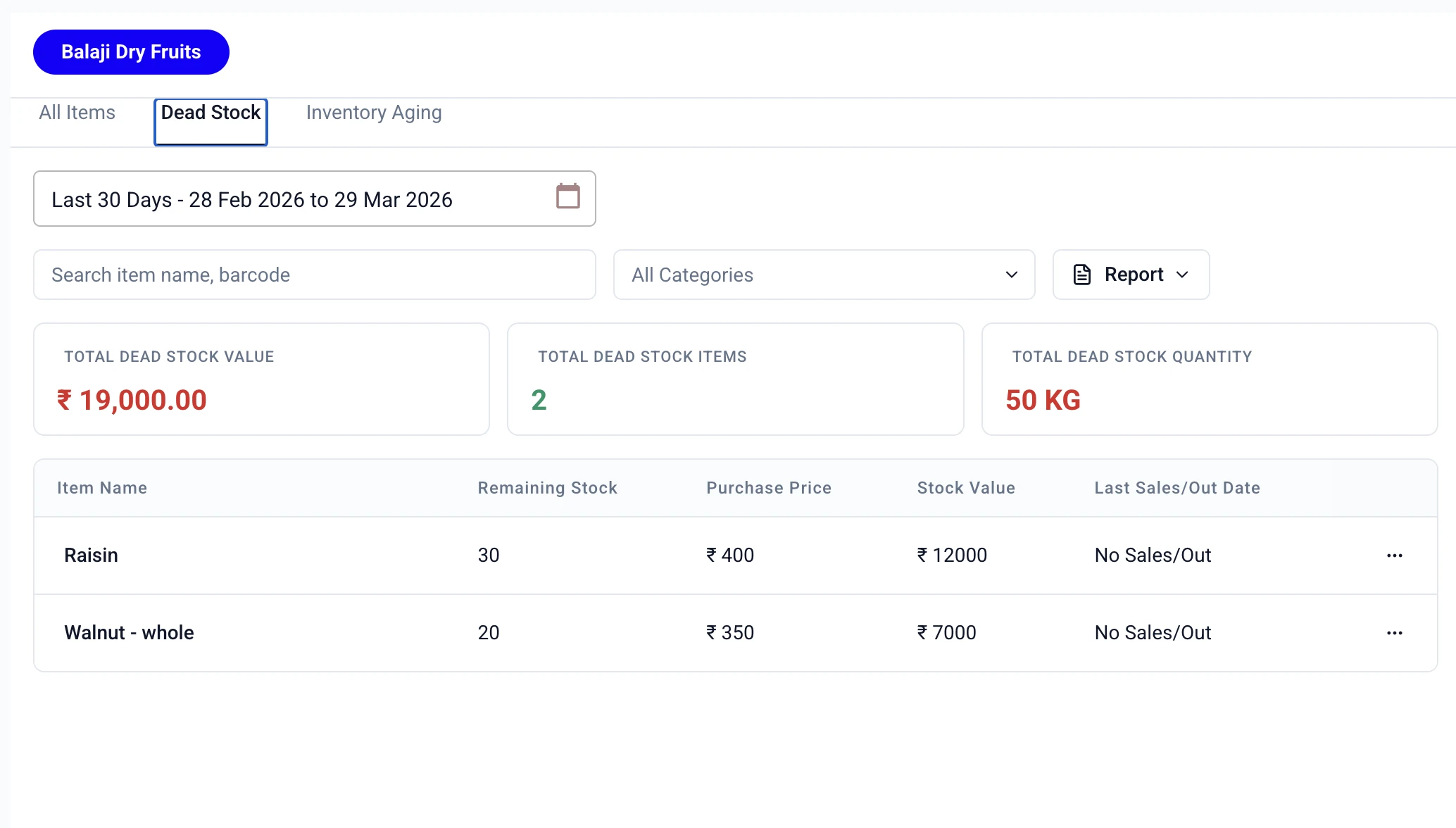
Product proof: the screen shows recorded Dead Stock fields and filters. The owner still checks the actual packs, unit, condition, location and supplier or customer action.
For cash prioritisation, compare the remaining quantity with the purchase price in the same unit. For a location question, switch to the store or godown view where supported. When goods genuinely move between your locations, record a Stock Transfer with its source, destination, item and quantity. These entries make the next conversation easier to trace; they do not forecast demand, choose a discount, approve a return, count the shelf or decide a write-off.
How the decision changes by shop, branch or godown
Retailers and kirana shops
The key question is whether the pack is visible and priced for the customer at the counter. Check the shelf, back rack, pack size and recent requests before ordering another carton. Keep only the quantity that fits the shop’s selling pattern.
Wholesalers, distributors and FMCG stockists
The key question is whether the item can serve a retailer route or branch. Check cartons by godown, route, variant and case unit, then compare open retailer orders with stock elsewhere. A transfer may solve the location problem; a supplier return or pause may solve a variant problem.
Pharmacies and medical shops
The key question is whether the exact strength, pack and printed date fit a safe sale or supplier conversation. Check the batch, expiry, seal, demand and return terms. Keep date checks separate from ordinary slow-sales checks and follow the expiry-date routine.
Hardware shops
The key question is often specification, not popularity. Put the fitting, model, thread, size or length beside the customer request and item record. Correct a wrong description or unit before buying more.
Multi-location businesses
The key question is where the item can be used next. Compare the same item and unit at each shop, branch and godown. A line with no movement anywhere needs an owner-led return, bundle, clearance, write-off or stop-order discussion. The low-stock-across-locations guide covers the opposite case, when one location is short.
A weekly slow-stock meeting that ends with an owner
Keep this meeting short and use one item list. Start with quantity, purchase value, then date or condition risk. For every line, state the item and unit, location, saleable quantity, last movement, action, owner and next date. Counter checks customer fit, godown counts and separates, purchasing pauses the line, and the supplier or receiving team answers return or transfer questions.
Daily, weekly and monthly checklist
Daily
- Record purchase inward, sale, return, transfer and confirmed adjustment against the right item, unit and location.
- Put damaged, returned, held or expiry-risk goods aside from saleable stock.
- Before adding a repeat item to a purchase note, check whether the same item is already on hold for a slow-stock reason.
- When a customer asks for a slow line, note the exact pack, size, model or strength instead of treating a similar item as a sale.
Weekly
- Pick slow and dead lines from recorded movement and count the saleable quantity.
- Multiply quantity by purchase price in one unit and start with the lines tying up the most purchase money.
- Compare each branch, shop and godown before choosing a transfer or fresh purchase.
- Check price, display, pack, customer fit and supplier-return terms with the person who owns that part of the work.
- Give every line one next action, one owner and one date; remove it from the next purchase until that action is complete.
Monthly
- Compare slow stock by item, category and location; look for repeated lines and wrong units.
- Separate seasonal, expiry-risk and damaged goods from ordinary slow stock before discussing a clearance price.
- Check whether a supplier minimum, pack size or case unit is creating extra quantity that the shop cannot use.
- Discuss confirmed losses and any accounting treatment with the owner and CA; keep operational records separate from that decision.
- Read the purchase-planning guide only after the line has a reason to be bought again.
Slow-moving stock needs checking, not a verdict. Verify item, unit, location and condition before acting.
What Stock Register records for this check
- In Stock Register, review recorded item movement, remaining quantity, stock value, category and store/godown position where the plan and view support them.
- Use the Dead Stock or Inventory Aging view to find lines with no recent movement or older recorded stock, then open the item and location detail that explains what you are seeing.
- When goods genuinely move between your own locations, record a Stock Transfer with its source, destination, item and quantity.
These records support the conversation; they do not count the shelf, inspect the pack, choose a discount, approve a supplier return, decide disposal or make the next purchase automatically.
Related resources
Frequently Asked Questions
How long before stock is called slow-moving?⌄
There is no universal number of days. Choose a period that matches the item and your buying cycle, then compare the last sale or outward movement with the quantity still on hand. A seasonal or expiry-risk item needs its own context rather than one blanket age rule.
Should I discount slow-moving stock?⌄
Only after checking why it is slow and whether the price, pack, condition and customer fit allow a sale. The owner decides the price and margin; do not assume a discount will recover the purchase cost. If the item is damaged or short-dated, follow the relevant supplier and product rules first.
When should I transfer slow stock to another shop?⌄
Transfer it when the receiving shop has a real use for the same item and unit, the goods are saleable, and the sending shop can spare them. Check both locations and record the movement; a transfer is not a sale or a new purchase.
How can I see which slow stock is tying up the most cash?⌄
For each line, multiply the remaining quantity by the purchase price you are using for the check, then compare lines by item, category and godown. In Stock Register, use Stock Tracking to view recorded remaining stock, purchase price and stock value where the relevant view supports them; the owner still decides what is saleable and what action is sensible.
Can Stock Register decide what to do with dead stock?⌄
No. In Stock Register, use Stock Tracking to inspect recorded Dead Stock and Inventory Aging information, item details, stock value and location-wise records where supported. The owner and team still decide whether to keep, transfer, return, discount, bundle, write off or stop ordering.
What should a pharmacy check before buying another slow medicine?⌄
Check the exact strength and pack, batch number, printed expiry, physical condition, recent demand and supplier-return terms. A slow medicine with a short remaining date is an expiry-risk decision, not just a slow-sales decision; follow the separate batch and expiry routine.