Multi-stage Manufacturing Software for Indian Manufacturers

Stock Register’s multi-stage manufacturing software gives Indian manufacturers stage-wise production tracking, from intermediate items to finished goods.

Record partial output, check work in progress and follow the remaining quantity. Start from a Recipe/BOM or a saved Manufacturing Process.

Need to save the same stage sequence for repeat jobs? Set up Manufacturing Processes →
Start 7-Day Free Trial →No payment required
4.5/5(1,000+ reviews)|2,50,000+ businesses|Web
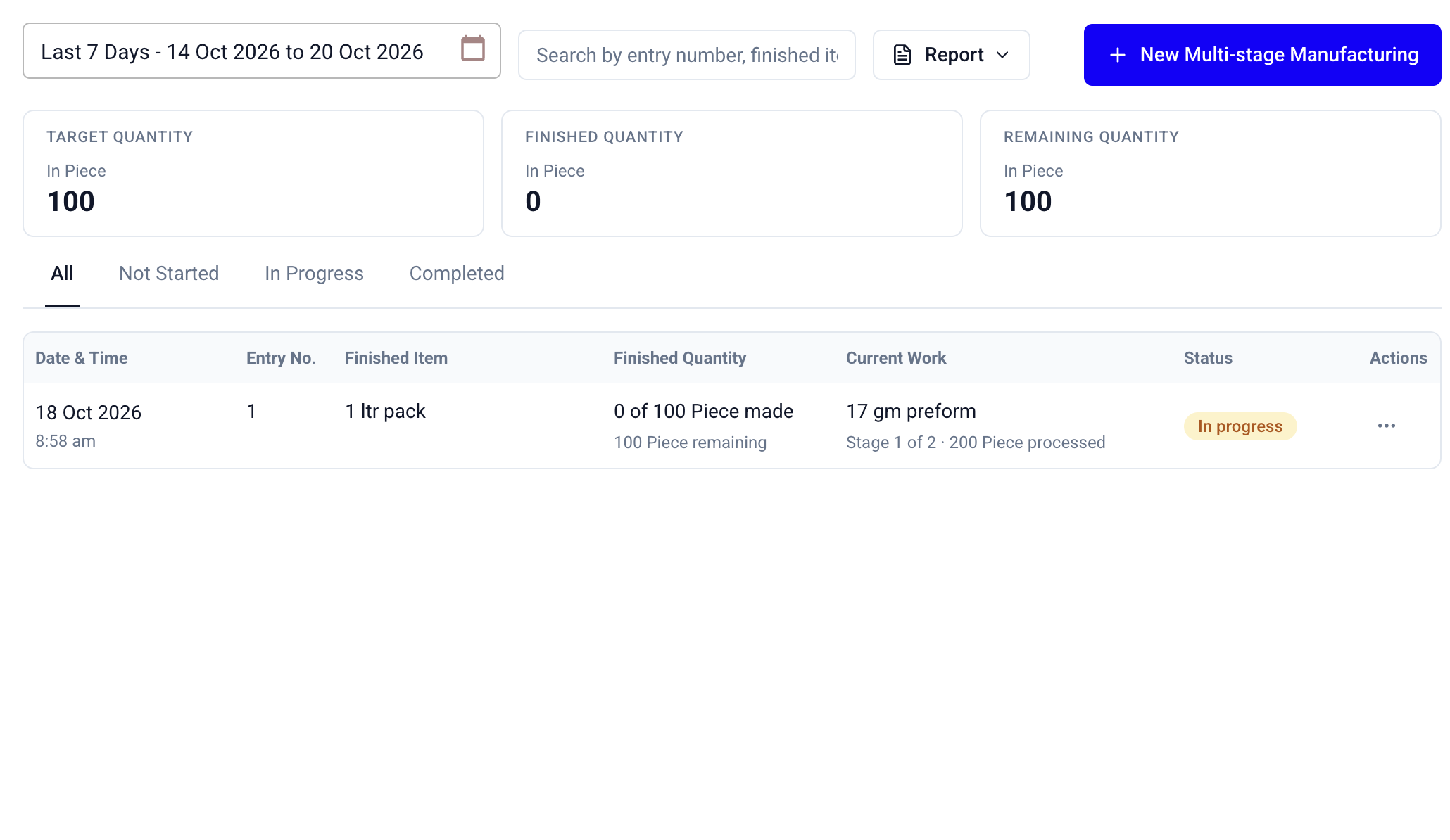
Multi-stage Manufacturing list with date and search filters, quantity summaries, current work, status tabs and a Report action.

Stage-wise Production Tracking and Work in Progress

Check what has been completed at each stage and what still needs to be made. Keep intermediate work separate from finished stock.

Common problems this solves

A stage is done. Is the order finished?

Not necessarily. Keep intermediate output and finished quantity separate, so a completed first stage does not look like a finished product.

What can the team work on next?

Check each stage’s target, completed and remaining quantities, together with its status and required earlier items.

The same process gets written out again

Save the order of work once in Manufacturing Processes and reuse it when setting up the next job.
1

Track work in progress at each production stage

  • For work in progress (WIP) tracking, open a job to see each stage’s target, completed quantity and balance. Semi-finished output stays separate from the finished quantity at the top.
  • Track partial output rather than waiting for the whole stage to finish.
  • Check dependencies before recording the next stage.
  • Keep quantities in their own units instead of adding unlike units together.
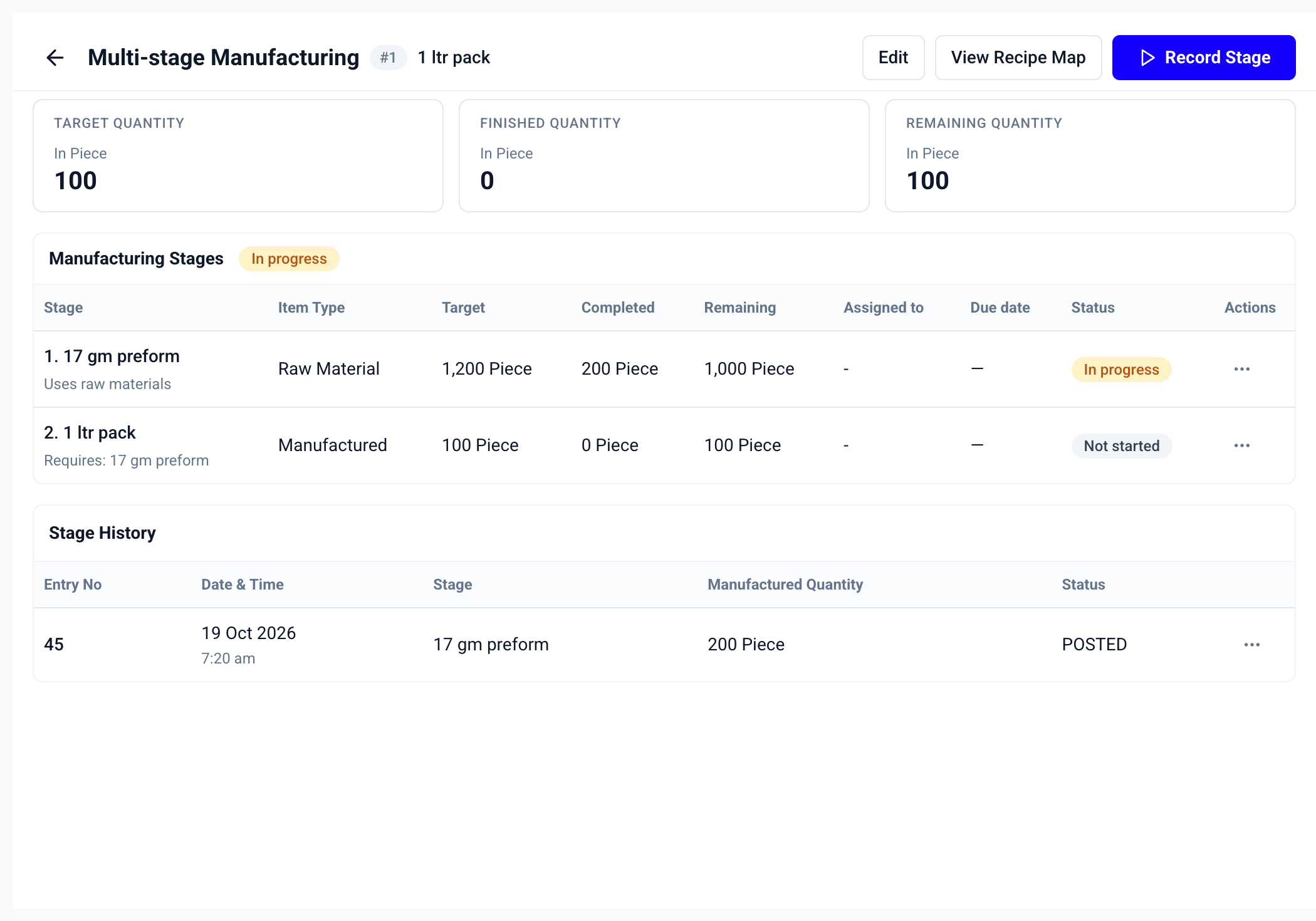
  • Actual web-app example: 200 preforms are recorded, but finished packs are still 0 of 100. Intermediate work is not counted as finished stock.
Multi-stage job showing 200 preforms completed, 1,000 remaining and no finished packs yet, with a posted stage-history entry.
2

Set the sequence once. Use it for the next job.

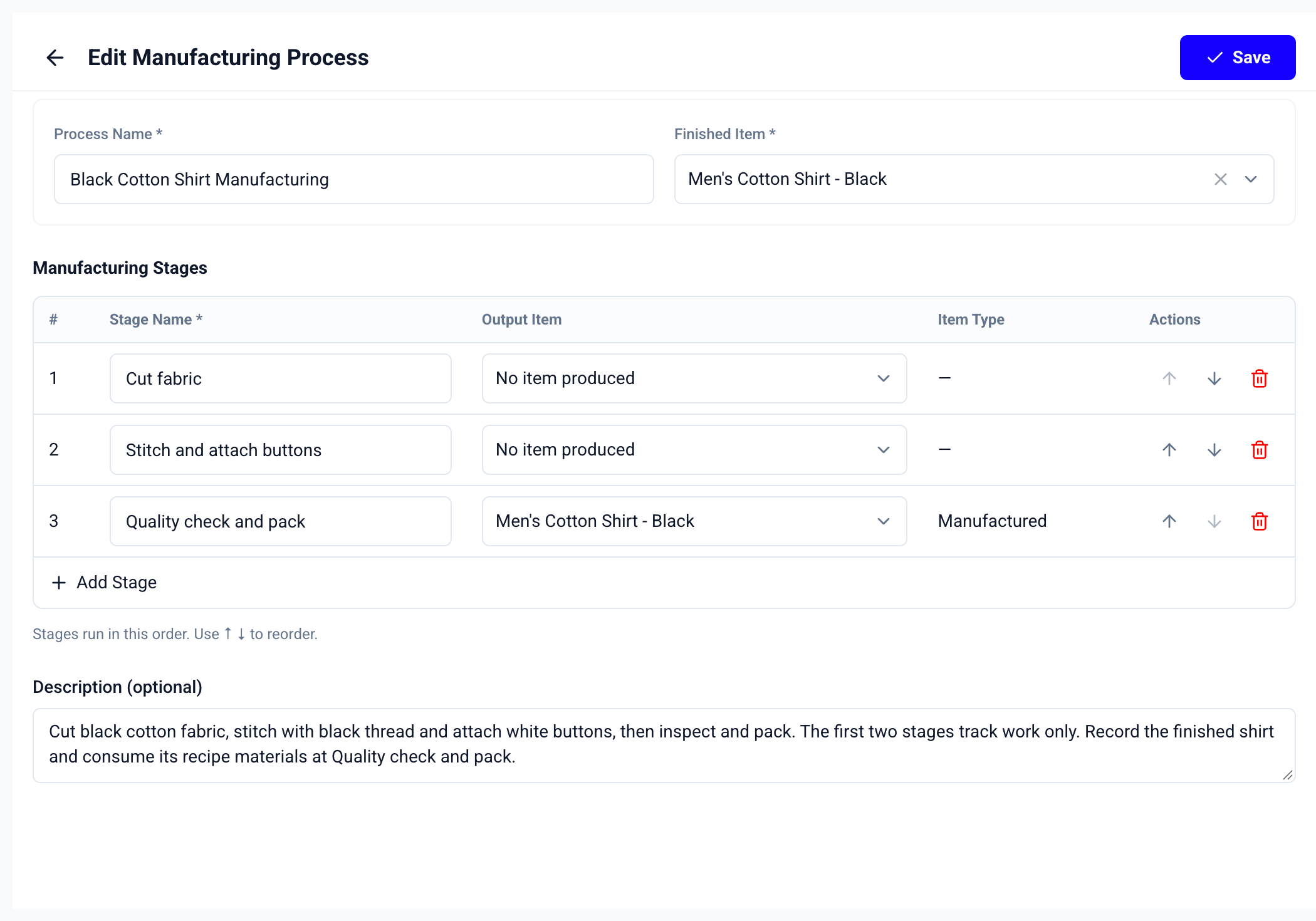
  • Name the stages in the language your team uses, choose an Output Item where a stage produces stock, and use the arrows to put the stages in order. A work-only stage can track progress without creating an inventory item.
  • Reuse a saved process instead of recreating the same sequence.
  • Show the item’s stored type alongside stage output.
  • Use recipe-derived stages when the product’s BOM already defines intermediate items.
  • An ordered process can include work-only stages and a stage that produces the finished item.
Manufacturing Process editor with ordered cutting, stitching and packing stages, output items and reorder actions.
3

Record the quantity made, then follow its entry

  • Record stock-producing stages through the manufacturing-entry flow. Use its material consumption, extra costs, raw-material wastage and scrap/by-product fields when needed. Stage History connects the recorded quantity to its entry number, date and status.
  • Only posted production updates stock; pending approval is not finished stock.
  • Add attendance staff and stage due dates when you need responsibility and timing.
  • Keep scheduling optional so a simple job stays quick to create.
4

Find the jobs that need attention

  • Review current work beside finished and remaining quantities. Use store selection, date filters, search and status tabs to narrow the list, then export a PDF or Excel report for that selection.
  • Review Not Started, In Progress and Completed jobs separately.
  • Use the recipe map to understand material and sub-assembly requirements.
  • Keep staff access consistent with their role, allowed stores and entry settings.
  • The list shows current-stage progress alongside the finished quantity, rather than presenting them as the same number.
Multi-stage Manufacturing list with date and search filters, quantity summaries, current work, status tabs and a Report action.

Multi-stage Manufacturing Features

Recipe-based Stages
Saved Manufacturing Processes
Ordered Stages
Output Items
Work-only Stages
Partial Production
Stage Dependencies
Target Quantity
Finished Quantity
Remaining Quantity
Stage History
Optional Staff Assignments
Job and Stage Due Dates
Recipe Map
Date and Status Filters
PDF and Excel Reports
Role-based Access
Manufacturing Pro

How Multi-stage Manufacturing Works

Prepare the stages, create the job, record completed quantities, and follow the balance.

1

Prepare the Recipe/BOM

Define the materials and intermediate items required to make the finished product.

2

Save a Manufacturing Process

When you need a reusable sequence, name the stages, choose their output items and put the work in order.

3

Create the manufacturing job

Choose the finished item and target quantity. Review the generated stages and add staff or due dates only if needed.

4

Check the stage requirements

Review each stage’s target, required earlier items and remaining quantity before starting production.

5

Record work as it happens

Open a ready stage and record the quantity completed. Stock-producing stages use the manufacturing-entry flow.

6

Follow the balance to completion

Review stage history, remaining quantities and finished output. Export the filtered job list when you need a report.

Follow Every Production Stage in One Place

Try Multi-stage Manufacturing and Manufacturing Processes during the 7-day free trial. Both features require Manufacturing Pro.

Compare Manufacturing Plans

Manufacturing

Solo owner

Recipes/BOM, raw materials, production entries, costs and manufacturing reports.

₹4,000 / year
₹3,000 / year

Owner (1 User) · Just ₹250/month · excl. GST

Start Free Trial

No advance payment · No setup fee

Manufacturing Plus

Team plan

Manufacturing with staff access, job work orders, material issues and goods receipts.

₹6,700 / year
₹5,000 / year

Owner + 3 Staff (4 Users) · excl. GST

Start Free Trial

No advance payment · Cancel anytime

For Multi-stage Manufacturing

Manufacturing Pro

Team plan

Everything in Plus, with Multi-stage Manufacturing, Manufacturing Processes, approvals and activity history.

₹8,000 / year

Owner + 3 Staff (4 Users) · excl. GST

Start Free Trial

No advance payment · Cancel anytime

All plans include inventory and GST/non-GST billing. Multi-stage Manufacturing and Manufacturing Processes are included only in Pro.

View full plan comparison →

FAQs

Frequently Asked Questions

Answers about production stages, partial quantities, Manufacturing Processes, staff access and Manufacturing Pro.