Negative stock troubleshooting guide
Why Stock Goes Negative After a Sale: What to Check Before You Adjust It
Why stock goes negative after a sale—and what Indian retailers, wholesalers and distributors should check before making a stock adjustment.
For Indian retailers, wholesalers, distributors, FMCG stockists and multi-location merchants checking a negative item balance after billing.
Stock goes negative after a sale when the quantity sold is greater than the usable quantity recorded for that item at the supplying location. Before you adjust it, check the item, unit, store or godown, recent inward and outward entries, and the physical quantity. A negative number is a clue to trace, not a reason to erase.
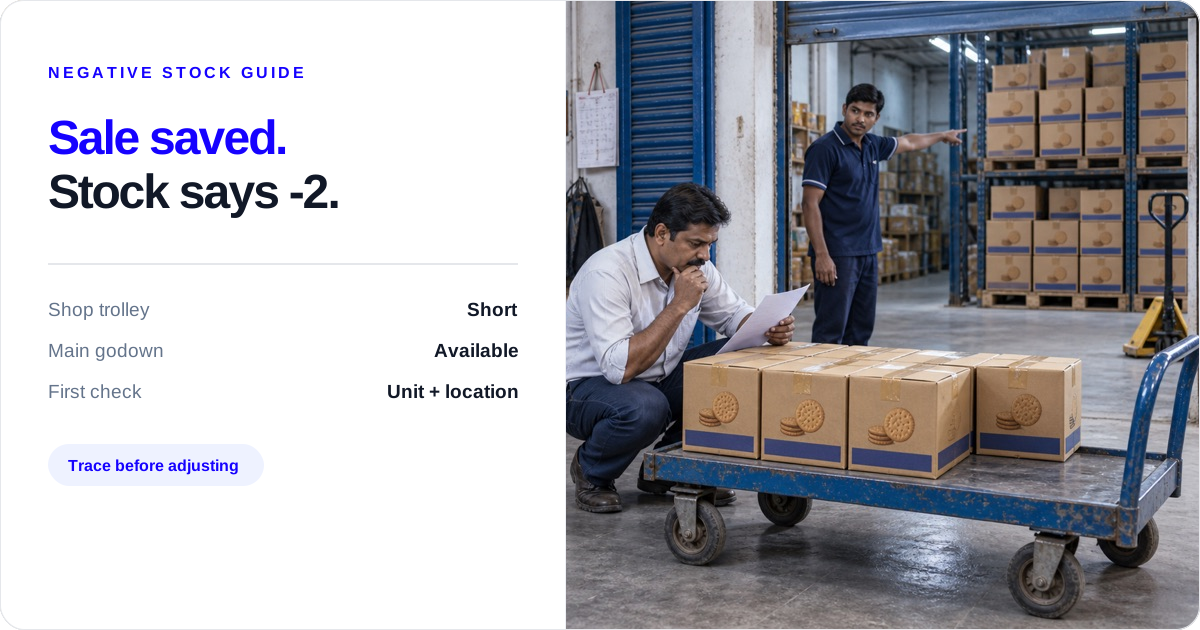
This problem usually appears at the worst time. A retailer wants goods immediately, the counter person saves the bill, the godown worker picks the order, and the stock balance suddenly shows -2. In a wholesale or distribution business, the Main Godown may still have cartons, but the Shop that is meant to dispatch them is short. The business has a sale, a customer promise and a stock record that do not agree.
The right first question is not “How do I make the balance positive?” It is “Which item, unit, location or movement created the difference?” The answer tells you whether to correct a transaction, record a transfer, enter a return, or make a reasoned stock adjustment.
What negative inventory after a sale actually tells you
A negative balance is a relationship between recorded movements. It says that, at one item and one location, recorded stock going out is greater than recorded stock coming in plus the opening quantity. It does not, by itself, prove that goods are missing.
For example, a Shop can show -2 cartons for either of these reasons:
- The Shop really had 6 cartons and the team sold 8.
- The Shop had 6 cartons recorded, while 2 cartons were sitting in the Main Godown and the sale was made before the internal movement was recorded.
The numbers look the same on screen, but the next action is different. The first case may need an investigation and possibly a Stock Out adjustment. The second needs the actual source and destination movement recorded. “Add two cartons” makes the number look comfortable while leaving the business record wrong.
This is also why a combined business total cannot settle a location problem. Twenty cartons in the Main Godown do not make two cartons available at the Shop until the goods are actually moved and that movement is recorded.
The five-minute check before you touch the balance
Write down the item, pack, unit, selected store, sale quantity, and sale date and time. Then follow the same order every time a sale creates a negative balance.
1. Read the invoice line like the counter person
Check the exact item, brand, size, flavour, pack and unit. “Marie biscuit carton”, “Marie biscuit piece” and another pack size may look similar in a long item list but represent different quantities. Ask the person who picked the goods to show the pack that left the shelf.
If one carton contains 24 pieces and the bill is for 48 pieces, compare both sides in pieces or both sides in cartons. Do not compare 48 pieces with 6 cartons as if they were the same unit. If you buy cartons but sell pieces, read the carton-to-piece stock conversion guide for the right way to record it.
2. Confirm where the goods left from
The billing counter, salesperson and dispatching godown may be different places. Check the store selected on the sale against the dispatch slip, picking note or godown worker’s confirmation. If the Shop supplied the customer but the Main Godown was selected, the problem is location, not necessarily shortage.
Do not use a stock adjustment to hide a sale entered against the wrong store. Correct the underlying entry when your business process permits it, then check both location balances again. For a broader location comparison before dispatch, use the warehouse-versus-store mismatch guide.
3. Find the last balance that made sense
Open the item’s history and work backwards from the negative sale. Look for the latest purchase inward, sale outward, sales return, purchase return, Stock Transfer and Stock Adjustment. Compare the date and quantity with the bill, dispatch note or return document.
One duplicate sale, one late purchase inward and one transfer entered as a sale can all create a negative balance. They do not have the same owner:
- The counter or billing person checks a duplicate or wrong item entry.
- The purchase or godown team checks a delivery that came in but was not entered at the receiving location.
- The owner or dispatch team checks whether goods moved between locations.
In Stock Tracking, use the item ledger and stock movement/history as a record of what the team saved. It helps you identify the entry to investigate; it is not a replacement for checking the goods.
4. Count the places where the goods could be
Count the shelf, godown rack, picking area, delivery vehicle and goods set aside for a retailer order. Use the same unit as the sale, and separate saleable goods from damaged, expired or returned goods that have not been checked.
When sales must continue, use the open-shop stock count routine to mark one area, record the count time and keep later sales separate from the physical quantity.
Write down the count time. A count taken before a dispatch and a sale saved after the dispatch can appear inconsistent even when the goods moved as expected. Likewise, a purchase physically received at 10 a.m. but entered at 4 p.m. needs a timing conversation, not an automatic adjustment.
5. Decide who owns the next action
Name one person to answer the question and one person to make the entry. The counter person may explain the invoice, the godown team may confirm the quantity, and the owner may decide whether a correction is justified. If a customer or supplier return is involved, keep the original document with the person handling it.
Do this before changing the balance. A small note such as “Shop count 6; Main Godown count 20; 8-carton sale saved at Shop; transfer not found” gives the next person something useful to check.
Four causes, four different fixes
Wrong unit: pieces and cartons were mixed
This is common when suppliers sell by carton but customers buy by piece. The item setup, opening stock, purchase inward or sale may use different units. Convert both quantities to one agreed unit, verify the pack size, and correct the transaction or item setup.
Do not “add stock” to cover a conversion error. If the item has 6 cartons and each carton has 24 pieces, the recorded quantity should be understood as 144 pieces when that is the chosen base. The physical count must confirm the pack relationship; the software record alone cannot do that.
Wrong location: the goods exist elsewhere
The Shop is short, but the Main Godown has the cartons. Check whether the goods actually moved. If they did, record the source, destination, item and quantity. If they did not, decide whether the order should wait, be supplied from the godown, or be changed to the quantity the Shop can dispatch.
In Stock Transfer, the current product evidence covers source and destination selection, item quantities and a recorded internal movement. The merchant still decides when the goods moved and whether the receiving location has physically checked them.
Late or missing inward: the goods came in but the record did not
Match the supplier bill, receiving location, item, unit and quantity. If the cartons are in the godown and the purchase is genuine, enter the purchase according to the business’s accounting and stock process. Keep the receiving document with the entry so the next count has a clear explanation.
A supplier bill is evidence of a transaction, not proof that the correct item and quantity reached the correct godown. The receiving person still checks the cartons.
Wrong event: a return, transfer or correction was saved as a sale
A customer return is not a fresh purchase, and movement between your locations is not a customer sale. Damaged or missing goods are not a normal sale. Read the event that happened and use the matching entry type. If the original sale is wrong, correct it where your process allows instead of adding a second unexplained entry.
If the issue began with returned goods, use the sales and purchase returns guide before touching the balance.
Example: a Shop shows a negative balance after an 8-carton sale
SAMPLE STOCK POSITION
The sale changes one location first
The business still has cartons, but the Shop cannot fulfil the order until the movement is checked.
| Location | Before sale | What was recorded | Balance | What it tells you |
|---|---|---|---|---|
| Shop | 6 cartons | Sale: −8 | −2 cartons | Short at the supplying location |
| Main Godown | 20 cartons | Transfer: 0 | 20 cartons | Stock exists elsewhere |
| Business total | 26 cartons | Sale: −8 | 18 cartons | Total hides the Shop shortage |
Shop
−2 cartons- Before sale
- 6 cartons
- Recorded
- Sale: −8
- What it tells you
- Short at the supplying location
Main Godown
20 cartons- Before sale
- 20 cartons
- Recorded
- Transfer: 0
- What it tells you
- Stock exists elsewhere
Business total
18 cartons- Before sale
- 26 cartons
- Recorded
- Sale: −8
- What it tells you
- Total hides the Shop shortage
Sample figures — not a customer result. A distributor’s Shop shows 6 cartons of a biscuit item. An 8-carton retailer order is billed, making the Shop balance -2. The Main Godown shows 20 cartons. The salesperson says the stock is available; the Shop worker says only 6 cartons were on the trolley.
The owner asks three questions:
- Did the Shop physically have 8 cartons, or only 6?
- If only 6 were at the Shop, did 2 cartons move from the Main Godown before dispatch?
- Was the sale entered against the location that actually supplied the retailer?
The possible outcomes are different:
- Eight cartons were at the Shop: check whether the sale was entered against the wrong location or whether the count was taken after the movement. Correct the underlying record and recount.
- Six cartons were at the Shop and two were at the Main Godown: confirm the source and destination movement. Record the Stock Transfer if the goods moved; do not create a second sale.
- Six cartons were at the Shop and no movement explains the other two: hold the difference open, check duplicate sales and dispatch evidence, and let the owner decide whether a documented Stock Out adjustment is justified.
The bill records the customer sale. Inventory management also needs the location, movement and physical count around it. In Stock Register, the item ledger and movement history help trace saved entries; the owner and godown team decide whether the goods can be dispatched, transferred or corrected.
What to record after the cause is clear
Use the entry that matches the event, in this order:
- Wrong item, unit or location: correct the underlying transaction when your process allows it, then check the new balance and physical quantity.
- Goods moved between your own locations: record a Stock Transfer with the source, destination, item and quantity. Keep the transfer separate from the customer sale.
- Customer goods came back: record a sales return against the original sale, then inspect the returned goods before putting them back into saleable stock.
- Goods went back to the supplier: record a purchase return and keep the supplier document with it.
- Confirmed physical shortfall or found stock: use Stock Adjustment, select Stock In or Stock Out, enter the quantity, select the store and add a specific reason or remark.
Stock Adjustment is for a non-sale or non-purchase change. Stock Register’s Stock Adjustment guide covers adding or removing a quantity, selecting the store and recording a reason or remark. The adjustment appears in the item history, but does not prove why goods were short. Keep the count sheet, dispatch note or investigation note with the business records.
If the cause is still unknown, do not make several small adjustments until the number looks normal. Keep the negative entry visible and record what has been checked. A traceable open difference is more useful than a positive balance with no explanation.
The decision changes by merchant type
Retail shop: check the pack at the counter
The counter person usually sees the invoice and pack together. Before saving a sale, check whether the item is billed in pieces, boxes or cartons and whether the physical pack matches. At closing, review negative items against the shelf and that day’s customer returns.
The useful handoff is short: counter person confirms item and unit; shop worker confirms picked quantity; owner follows up on a difference. A retailer does not need a long report to start—one item, one shelf and one sale can reveal the mistake.
Wholesaler or FMCG distributor: separate order-taking from dispatch
The salesperson may take the order while the Main Godown, Branch or Shop dispatches it. Make the supplying location clear before saving the bill. If stock is in another godown, compare the dispatch location’s balance before promising the full quantity.
Use a transfer when goods really move between your locations. If they cannot reach the Shop in time, change the customer promise or buy more as a business decision. Stock Register records the saved movement; it does not choose the dispatch location or promise a delivery time.
Multi-location retailer: a combined total is not the answer
Compare the Shop, Branch and Main Godown separately. A business can have 100 pieces in total and still be unable to fulfil a 20-piece order from the location where the customer is waiting. Check the supplying store, recent transfers and the physical shelf before changing the balance.
For location-wise recorded stock, use the multi-godown feature page as the product source. For the operating decision, keep the owner or location manager responsible for what can actually leave that place.
Food, pharmacy and other date-sensitive businesses: quantity is not saleability
Count the usable quantity and keep damaged, expired or returned goods separate. A negative number may point to a movement problem, but a positive number does not prove that a batch is fit to sell. The owner or quality lead decides condition and saleability; a stock record does not decide that.
What not to do when stock goes below zero
- Do not add stock simply because the number looks uncomfortable.
- Do not record an internal transfer as a sale and a purchase.
- Do not use the Main Godown total to promise a Shop dispatch without checking the Shop’s balance.
- Do not put returned, damaged or expired goods back into saleable quantity without checking condition.
- Do not correct a location error with a Stock Adjustment when the original transaction can be fixed.
- Do not ask a staff member to count an inaccessible store and treat the result as confirmed.
- Do not assume that a saved sale proves the right item, unit, quantity or location was used.
A small routine that prevents repeat negative balances
Before billing:
- Confirm the item, pack and selling unit.
- Select the store or godown that will supply the goods.
- Check the recorded location quantity when the order is larger than the usual sale.
Before dispatch:
- Match the picked quantity with the invoice.
- Record a real inter-location movement as a Stock Transfer.
- Keep the dispatch slip with the entry when the order leaves from a different place than the billing counter.
At closing:
- Review negative or unexpectedly low items.
- Trace the latest purchase, sale, return, transfer and adjustment for one affected item.
- Count the shelf or rack in the same unit as the record.
- Write the cause or the unanswered question before making any correction.
Once a week, pick one fast-moving item and follow it from purchase inward to sale outward at one location. In a distributor business, include one godown-to-branch transfer. This small sample can catch a unit or location habit before it affects a retailer order.
If the team needs to establish that habit from the beginning—not only after a negative sale—read how to manage inventory in a small retail shop. It connects opening quantities, daily entries, priority counts and the next buying check.
Choose the next action from what you find
| What you find | Check first | Next action |
|---|---|---|
| Carton sale; pieces recorded | Pack size and item unit | Convert, correct and recount |
| Shop short; godown has stock | Supplying location and transfer | Correct location or record transfer |
| Customer goods came back | Original sale and condition | Record the sales return |
| Count is still short | Recent movement and evidence | Adjust only with a reason |
Carton sale; pieces recorded
- Check first
- Pack size and item unit
- Next action
- Convert, correct and recount
Shop short; godown has stock
- Check first
- Supplying location and transfer
- Next action
- Correct location or record transfer
Customer goods came back
- Check first
- Original sale and condition
- Next action
- Record the sales return
Count is still short
- Check first
- Recent movement and evidence
- Next action
- Adjust only with a reason
What Stock Register records
- Stock Tracking shows recorded item movement and running balance.
- Store or godown selection keeps recorded quantities tied to the location used on an entry.
- Stock Adjustment records a Stock In or Stock Out quantity with a reason or remark in the item history.
The merchant team must still confirm the physical count, item unit, location, dispatch, condition and cause before deciding what to correct.
Related resources
Frequently Asked Questions
Why is my stock negative after a sale?⌄
Stock is negative after a sale when the recorded quantity sold is greater than the recorded quantity for that item and location. Check the item, unit, supplying store, recent purchase or transfer, duplicate sale and physical count before correcting the balance.
Should I adjust negative stock immediately?⌄
No. First confirm the item, unit, location, recent movements and physical quantity. Correct a wrong transaction, record a real transfer or return, or use Stock Adjustment only when the remaining difference has a documented business reason.
Can stock be negative when goods exist in another godown?⌄
Yes. A Shop can be negative while the Main Godown has stock if the sale was recorded at the Shop or goods were not transferred before dispatch. Check each location separately and record the internal movement; a combined total is not proof that the Shop can supply the order.
How do I trace the sale that caused negative stock in Stock Register?⌄
In Stock Register, open Stock Tracking and review the item ledger for saved sales, purchases, returns, transfers and adjustments. Match those entries with the bills and physical count; Stock Tracking shows recorded movement, while your team confirms what actually happened.
When should I use Stock Adjustment instead of a sale?⌄
Use Stock Adjustment for a confirmed non-sale or non-purchase change, such as damaged, lost or found stock, or a documented count correction. If goods were actually sold, bought, returned or moved between locations, record that real event instead.
Does Stock Register automatically fix negative stock?⌄
No. Stock Register records the sale and other entries your team saves, and Stock Tracking helps you inspect the recorded movement. It does not decide whether the cause is a wrong unit, location, missing movement or physical shortfall; that check remains with the merchant team.